

As most of you Oracle Eloqua users know, there are constantly updates and improvements being made. We love this tool tip post about Program Canvas, but realized some pieces needed updating. This blog post was published in 2016, due to the changes made to Oracle Eloqua we updated it. Read on to learn more about Program Canvas.
As an Oracle Marketing Cloud Consultant, I have become all too familiar with Eloqua’s Program Builder over the past few years. Want to push your leads through a data standardization process? Use Program Builder. What if I want to create a custom lead scoring model? Hello Program Builder. And if I want to trigger a cloud connector that automatically submits a form? Program Builder can handle that. The truth is, Program Builder has been the go-to processing function inside of Eloqua since the platform’s birth. But, that’s changed with the introduction of Program Canvas.
First, the What:
Earlier this year, Oracle introduced a brand new tool in Eloqua that promised to “provide all existing capabilities” of Program Builder, but was described as the “next generation” for data processing and automated workflows. So what is this magical tool? Meet your new workflow automation best friend, Program Canvas.
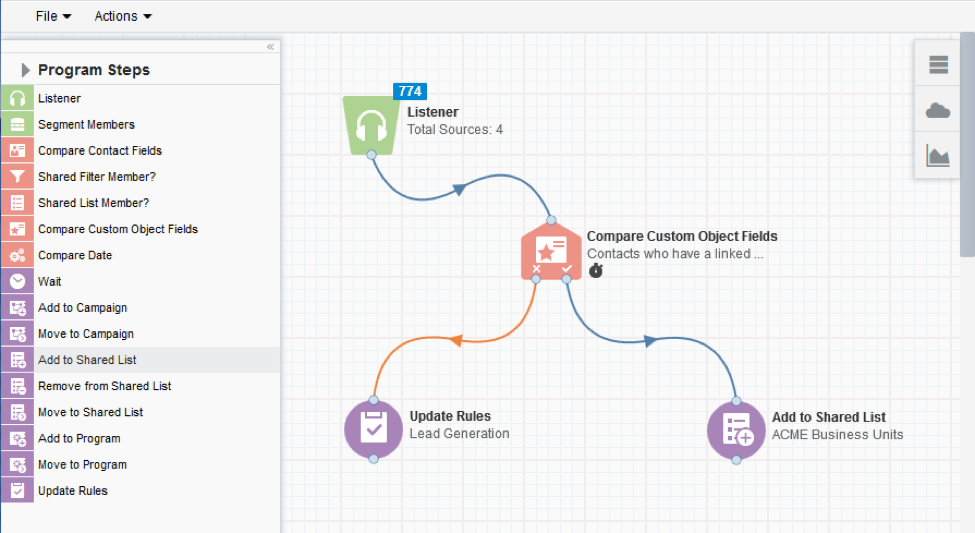
Program Canvas is a newly designed tool that combines the effectiveness and processing power of Program Builder with the interface and speed of Campaign Canvas. It brings the flexibility that we know and love within program building and adds a host of new benefits that help you achieve your wildest automation dreams
Then, the Why:
Program Canvas is fast. And I mean really fast.
You may be asking yourself why speed matters. Here’s why: Let’s look at a scenario that uses Program Builder to process a lead that fills out a form to download a white paper. Once the lead fills out the form, the record is sent to a 20-step Priority Mode program that standardizes the data before shooting it to CRM for sales to pick up. In Priority Mode, each Program Builder step takes 5 minutes to execute the configured action in that step before it sends the record onto the next step. The entire program could take almost 2 hours to run before sales sees the lead.
Let’s look at the same data standardization program executed through Program Canvas. The amount of time it takes for the lead to fill out the form, run through the 20-step standardization program, and be sent to CRM could be a matter of minutes. As you can imagine, this incredibly fast process could have a huge impact for both sales and marketing. On the marketing side, there’s the ability to trigger highly targeted nurture campaigns after instantly enhancing the data. Simultaneously, the sales team will have this high valued leads quickly, which in many cases, is very important.
Another benefit to Program Canvas is that it leverages Eloqua’s new AppCloud framework. As of March 31, 2017, Oracle decommissioned all Eloqua Cloud Connectors. Eloqua customers can no longer trigger Cloud Connectors within Program Builder. However, these connectors are slowly being transitioned onto the AppCloud framework for use in Program Canvas (and Campaign Canvas).
For example, clients who used the String Manipulator, Date Calculator, Math Function, or Name Analyzer Cloud Connectors can create the exact same functionality in Program Canvas with the Contact Washing Machine application. Similar to Campaign Canvas, these cloud actions or decisions can be accessed by clicking the arrow button next to the “Program Steps” header on the left pane.
Before After
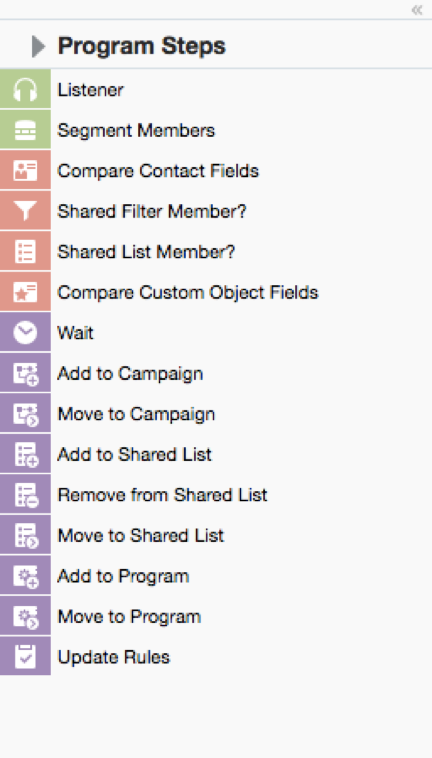
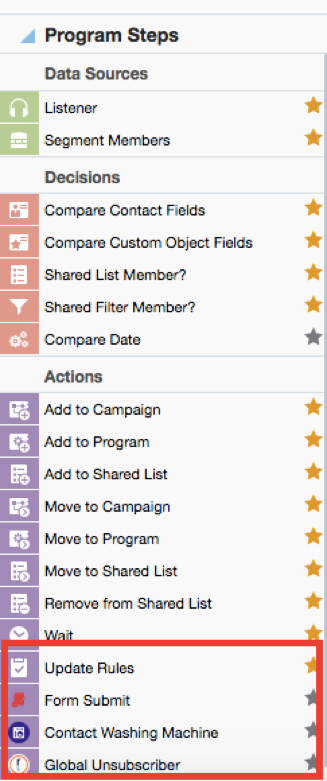
There are a number of apps available that run on Program Canvas, including a few that Relationship One have developed in-house. We’re sure to see a wider range of apps become available for use on the new canvas.
Now that you know some of the benefits of Program Canvas, here are a few use-cases to consider using this tool in conjunction with your current Oracle Eloqua configurations:
Take advantage of a contact’s changing lead score
One of the unique characteristics of Program Canvas is the “Listener” step, a feeder that continuously queries the database for records that meet certain criteria and feeds them into the canvas in real-time. One way to feed these contact records into the canvas is by configuring the “Listener” step to monitor a contact’s changing lead score. You simply drag the “Listener” step onto the canvas, add a source, choose the lead scoring model you want Program Canvas to monitor, and specify if it should look at either increasing or decreasing lead scores.
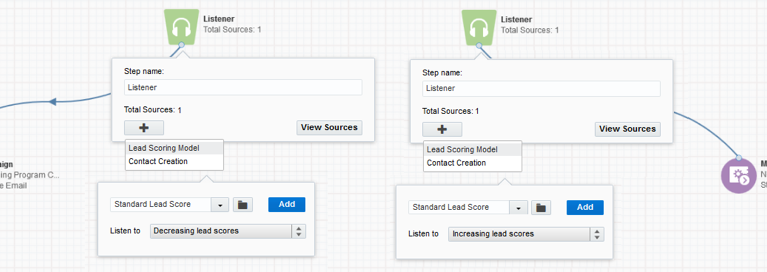
This is an incredibly useful way to push contacts with decreasing activity into a campaign that is aimed towards re-engagement. Or maybe the goal should be to push contacts with increased activity into a campaign that delivers exclusive content. Regardless, you can leverage the power of Program Canvas to better enhance your marketing efforts through changing lead scores.
Utilize Custom Object data for standardization and marketing efforts
Program Canvas is able to process two types of records: Contact and Custom Object (CDO) records. These two record types run exclusively within their own canvases, meaning you can create a Contact record-based Program Canvas or a Custom Object-based Program Canvas. With a Custom Object program, records enter through the power of Custom Object Record Services, in which newly created or modified Custom Object records can be added to the program.
Here’s a quick example of how to use program canvas for CDOs:
Let’s say you’re storing a Contact’s content preferences within a Custom Object and you want to perform a few actions based on a customer’s activities. You may want to:
- Trigger a series of update rules that timestamps each Custom Object field that holds subscription data
- Evaluate the Contact record’s newly modified content preference fields and perform actions based on this new information
- Add the linked Contact record to a standardization program running in program canvas
- Send the Contact to an ongoing email campaign based on the updated preferencesIn addition to the use-cases above, our clients use Program Canvas to monitor their Contact Level Security, and for those that use Oracle Sales Cloud as their CRM system, they can use Program Canvas to trigger a variety of API calls to create leads, update leads, or create contacts.
In addition to the use cases above, our clients use Program Canvas to monitor their Contact Level Security, and for those that use Oracle Sales Cloud as their CRM system, they can use Program Canvas to trigger a variety of API calls to create leads, update leads, or create contacts.
Note: Non-OSC customers must continue to use Program Builder for that type of integration work. I am hopeful that the continued improvements to Program Canvas include a release of integration calls that are widely compatible.
Finally, the How:
The following is no longer true, because luckily, Program Canvas is now available to all Oracle Eloqua users.
[Today, Program Canvas is released under controlled availability. This means that your Eloqua customer administrator must log a Service Request with Oracle Support in order to get access. Here’s the information you should include in your service request:- The name of the Eloqua install (what is typed in the “Company” field upon login)
- Whether the feature should be enabled for all Eloqua users or specific users. If Program Canvas should only be available for specific users, please provide the names of the users (or the security group) that should have access.
After Oracle Support confirms that Program Canvas is enabled within your company instance, you will be able to access it by migrating to Orchestration à Programs.]
In summary, Program Canvas is an incredibly powerful tool that has huge impact on processes and workflows setup in Oracle Eloqua. It has created significant increase on the ways in which data can be utilized within the platform, while decreasing the amount of time it takes to process similar tasks through Program Builder. I am really looking forward to seeing how this tool develops throughout the upcoming months because what we’ve seen so far can be a game-changer for many of our Oracle Eloqua customers.
Ready to set up Program Canvas in your Eloqua instance but need a little extra support? Let us know! Or maybe you’re already using Program Canvas and you want to roll it out to a larger group? Tell us about your experience in the comments below or fill out this form and someone will get back to you.
Share This
About the Author: Relationship One





