Hey, hey! Welcome back to my Code Like a Boss series where we break down the basics of HTML and CSS to gradually build the components of a simple email. There are a number of posts in this series, each containing a specific lesson that builds on the previous posts. If you’re just joining us, here’s a good place to start.
The last lesson covered some best practices around adding copy to our email. Today, we’re going to add a link in three easy, breezy steps. Ready? Of course you are.
Step 1: Tag it
Like most HTML elements, links use a special tag called the anchor tag, which looks like this: <a></a>. To create a link, start by placing the opening and closing anchor tags around your call-to-action text, like so:
Bacon ipsum dolor amet beef ribs sausage turducken, ground round strip steak kielbasa ball tip
bresaola rump shank short loin capicola pork loin.
Leberkas shoulder venison prosciutto.
<a>Bresaola pork loin</a> turkey, leberkas short ribs spare ribs strip steak porchetta prosciutto
pastrami shank ham hock.
If you view our email in a browser, you’ll notice that nothing has changed. The text looks the same and it doesn’t do anything when you click on it.

Step 2: Link it
To make our link actually look and function like a link, we need to add an attribute that tells the browser where to send the user if the link is clicked. This is called the “href” (short for “hypertext reference”) attribute, and it looks like this: <a href=””></a>. Just like any other attribute, it follows the same conventions we discussed in the previous HTML Tables post. As you’ve probably already guessed, your URL goes between the quotes, like so:
Bacon ipsum dolor amet beef ribs sausage turducken, ground round strip steak kielbasa ball tip
bresaola rump shank short loin capicola pork loin. Leberkas shoulder venison prosciutto.
<a href="http://www.google.com">Bresaola pork loin</a> turkey, leberkas short ribs spare ribs strip
steak porchetta prosciutto pastrami shank ham hock.
So, now your link should be blue and underlined, and when you click it, it should take you to Google. Nice work.

You’ll notice that when you click the link, the URL opens in the same window/tab, directing you away from the page you started on. This is the default functionality of a link, but it can be changed using the “target” attribute. Before we dig into that, however, I should say that this is a pretty widely debated subject in the UX/world. Some people think it is best to empower the user to choose their own experience, while others feel it’s perfectly expectable (and more user-friendly) to force a new tab to open. I recommend doing some reading on the subject before you decide. Here are a few articles to get you up to speed.
https://css-tricks.com/use-target_blank/
http://thinksem.com/blog/should-i-open-external-links-in-new-tab/
http://libux.co/links-should-open-in-the-same-window/
If you’ve decided that you want to open your link in a new tab, you can leverage the “target” attribute and give it a value of “_blank”, like so:
Bacon ipsum dolor amet beef ribs sausage turducken, ground round strip steak kielbasa ball tip
bresaola rump shank short loin capicola pork loin. Leberkas shoulder venison prosciutto.
<a href="http://www.google.com" target="_blank">Bresaola pork loin</a> turkey, leberkas short ribs
spare ribs strip steak porchetta prosciutto pastrami shank ham hock.
This is the most common value for the target attribute, but there are a few others to choose from. See w3schools for full documentation.
There are many other attributes you can use to add functionality to your links, but “target” and “href” are the main ones to focus on.
Step 3: Style it
To change your link’s font, color, size, etc., use your mad inline CSS skills to target the link directly. If you need a refresher, see my last post on adding copy.
For this example, we’ll make the link pink to match our headline and remove the underline, like so:
Bacon ipsum dolor amet beef ribs sausage turducken, ground round strip steak kielbasa ball tip
bresaola rump shank short loin capicola pork loin. Leberkas shoulder venison prosciutto.
<a href="http://www.google.com" target="_blank" style="color: deeppink; text-decoration: none;">
Bresaola pork loin</a> turkey, leberkas short ribs spare ribs strip steak porchetta prosciutto
pastrami shank ham hock.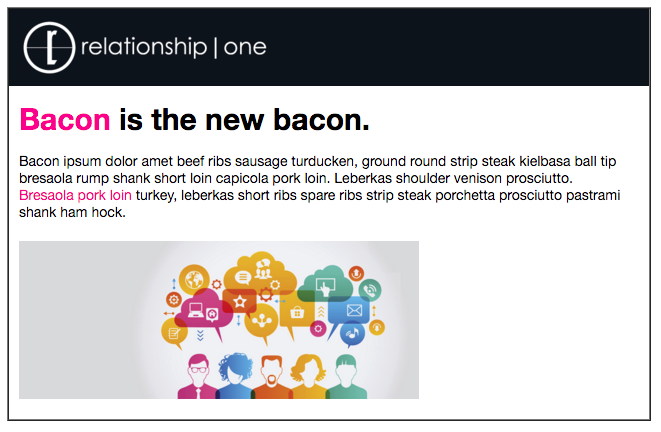
That’s all for today’s lesson, folks. Hope you find it useful. Have fun adding links to your email, and don’t hesitate to reach out with questions. Until next time, happy coding!
Share This
About the Author: Relationship One