Writing documentation of any kind can be a daunting task. Where to start? How detailed should it be? Is it geared more to a technical audience, or should it be written more in laymen’s terms? Screenshots: yay or nay? While process documentation is a unique case-by-case writing process, check out some best practice tips below to get the ball rolling when drafting up documentation.
1. Start with drafting an outline to organize notes and thoughts in the correct order to confirm that all pertinent information is covered before writing the document. This will save time in the long run if all steps are outlined initially to avoid missing process details and leading to re-writes later.
2. When it comes time to start writing up the process document, it’s important to consider the target audience. Is this an internal document that will only be shared within the company or will it be shared with a greater audience? Will those reading it have similar skills and knowledge or will they have a broader skill and knowledge base? It is important to consider the audience, so the document is approachable and easy to understand when referenced. It’s also very important to note that confirming the audience prior to drafting the document is essential when it comes to confidential company information. Pay attention to any details pertaining to confidential company information and avoid adding it to the document prior to sharing with external readers.
3. Draft the document in a format that is viewable and accessible across the most common operating systems and platforms, if possible. For example, MS Word is a common avenue in which to, however, a best practice is to export the document to a PDF file to ensure correct rendering and accessibility when viewed in different operating systems.
4. Naming conventions of the document file should include the MMYYYY in file name for version control. Standardizing naming conventions for documentation will aid in organization and ensure the most current information is referenced. Within the document, after the Title, include the author’s name and creation date. Each time the document is updated, include the new author’s name (if necessary) and included an “updated” date.

5. After the title, date, and authors are outlined, it’s time to start the meat of the document. It’s best to include a brief overview of what the document will detail and for what tasks it is used. It’s also important to include the cadence that the process outline should be performed. The Overview is a synopsis of what the document outlines and gives the reader a quick idea of what the document covers and if it is relevant to their needs.

6. Include a list of any required points of access that the reader will need in order to complete the process outlined. Provide details into what user permissions, access to platforms, login credentials, and any access to data sources that are needed to complete the steps outlined in the document. Also, it is important to include contact information for any other individuals that are involved in the process. For example, if Steve is working through a process document and following the steps closely and needs a SME (in this case, Tony) to review his work, Steve can reach out to Tony as his contact information is clearly listed within the document.
7. Utilizing a table of contents (TOC) will streamline the document and help organize the process, while making it more accessible to the reader. A hyperlinked TOC allows for quick jumps to certain sections of the document allowing it easier to read and quicker to access. Below are a couple of TOC examples:
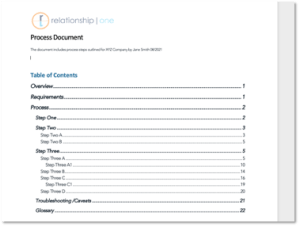
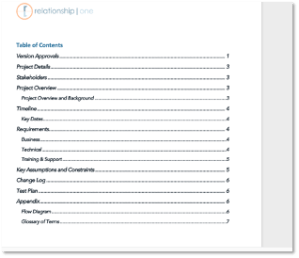
8. When detailing the process steps, number each step for easy reference and provide images when explaining how to complete a process. Don’t assume that the reader will “get the gist” of a step. Explain the process as if this is the reader’s first exposure, and include screenshots to help explain. The clearer the explanation, the easier it is for a reader to follow and complete the outlined steps. This saves time and sanity. The example below includes instructions to upload a file in Eloqua via the Contacts Wizard. Notice how the screenshot of Eloqua highlights what the instructions outline:

Not only does the reader have written instructions, but they also have a visual tool to help confirm the instruction is followed correctly in that stage.
9. After all pertinent information and instructions are written in the document, it is another best practice to include any caveats or “gotchas” that may occur. Note these towards the end of the document and include solutions, if available. Also, include contact information for any people that are available to help with hiccups due to the caveats noted. This will help the reader stray from some frustration by providing them with a resource if/when they get stuck on a “gotcha.”
10. Include a glossary at the end of the document for definitions of any terminology or acronyms that are not considered typical nomenclature to the targeted audience.

11. Add finishing touches such as page numbers, company logo in header or footer, year of publication, confidential notices (if needed), and any applicable copywrites to complete the document. Prior to publishing, have a colleague or two read through for a Quality Assurance and spell check.
12. Once the document has been given the once (or twice) over, it’s ready for publishing, but the work doesn’t stop there. If the document outlines process steps that evolve over time, refreshing the documentation as processes change, ensure that the information stays current. It’s also important to store the document in a shared space for easy access by the appropriate audiences.
Following the best practices guidance outlined above will help ensure solid documentation practices to create seamless, engaging, and easy to read process documentation. If you need help documenting your processes, Relationship One is here to help
Share This
About the Author: Jess Sampson