

 Hello, old friend. Glad to see you back again! At this point in my Oracle SRM blog series, you may be feeling like you know it all. I like the confidence, but there is still plenty more to uncover! In my last blog, we finished up the capabilities of Listen & Analyze. The heavy lifting of SRM is behind us as we move onto Engage, an easy-to-learn, one-tab section that I consider to be a marketing team’s social media secret weapon.
During our Listen & Analyze lesson, we touched on creating Topics. Here, we made categories for partners, competitors, products and more. In each category, we set specific filters to see the social posts, online articles, and web pages that would be most beneficial for us to engage with. The Engage area is where we get the opportunity to do so! When you first enter Engage, there is an inbox that resembles an email inbox. You can choose to filter the messages in multiple ways (I’ll talk about this later). At the top right, you can click the sort option to view messages from oldest to newest or vice versa. You can also choose to archive messages to clean up any clutter.
Unread messages will be highlighted and read messages will be white. There will also be a small circle next to each message, indicating how many unread messages are in that specific thread. This includes comments on original posts. Here’s a screenshot from Relationship One’s SRM instance.
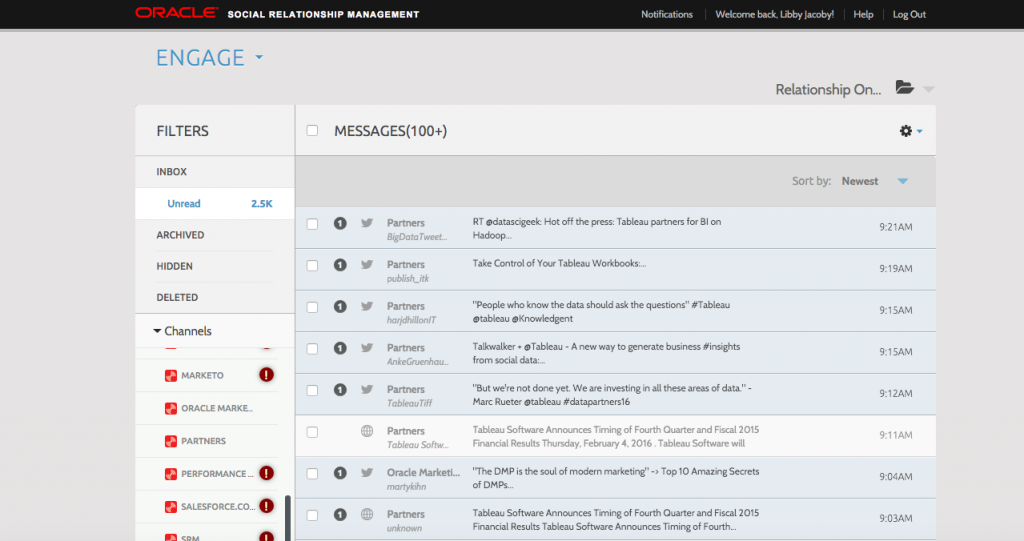
Notice that six messages down, there is a message we have viewed. This message relates to the details we chose in our “Partners” topic. It appears in our inbox because it matches the keywords and parameters we set up in our Topics. The icon next to the message tells us the post’s media type. In this case, it is an article on the web. Messages will also appear from Twitter, Facebook, LinkedIn and Google+. When you view content that has been posted on a social media, you get the options to engage with that content through SRM. Let’s take a look.

This Twitter post is from OracleDataCloud and it falls under our Topic of ‘Oracle Marketing Cloud’. After reading the original message, I can choose to immediately reply to the message. This will reply via your (or in this particular case, our) Twitter account, without needing to log into the channel! How’s that for taking a shortcut? You can manage all of your social media efforts in one platform. Pretty sweet.
In the drop-down to the right, you’ll see all of the other options you have for reacting to this message (or not). For Twitter content, you can Assign the message to another SRM user, Archive it, View it directly on Twitter, Mark as Unread to revisit later, Reply, Retweet, RT with Comment, Follow the user, Favorite the post, or Send Direct Message to the user. The capabilities extend much farther than Twitter itself, allowing for the optimum response and engagement with partners and leads.
Not only can you ensure relationship growth via SRM’s Engage, but you and other users can monitor negative feedback and respond quicker. This can be done early with Filter options, as mentioned earlier. The left column of the Engage Dashboard allows you to view all the methods of Filtering for easier searching. You can choose from Channel/Channel Type, Labels, Assignment and Date range.

No matter how you choose to filter, Engage allows you to customize your searches and optimize your social interactions. Be a social guru without having to watch endless Twitter feeds. Let the system do the work for you!
Well, that’s all folks…at least for Engage. It almost seems too easy, but your hard work with the past sections has paid off to prepare you for this function! Don’t be too sad though, there are still more Oracle SRM blogs to come. Stay tuned for my next post on Workflow & Automation.
Congrats on the Engagement! (Get it?)
Share This
About the Author: Relationship One





