

 What if I told you presents aren’t just for special occasions like holidays, birthdays and anniversaries? You’d be pretty excited, right? Well SRM users, consider it a good day! In my previous blog, I covered half of the functionality of Listen & Analyze. Now I am back with part two. In this blog, I’ll go over Indicators, Dashboards, SEM Reports, and Social Campaigns. Head into the new year full of knowledge about SRM’s capabilities! Indicators are first on deck. These tools go hand-in-hand with Dashboards. Indicators are “pre-configured semantic filters that allow you to extract and analyze more precise aspects of interesting conversations.” In simpler terms, Indicators are used with Topics to detect sentiments within conversations found throughout the web.
Oracle SRM already comes stocked with standard Indicators. An example Indicator that is standard to the platform is “Awesomeness”. This Indicator is stocked with preconfigured keywords and phrases to detect web content that speaks positively about your company. For example, if a customer posted a raving review of your product, it would be shown in this Indicator’s dashboard. But, you can also create custom Indicators that are applicable to your business. Indicators really come to life when you enter the Dashboards section. Once in Dashboards, select a topic bundle and begin to analyze sentiments and Indicators. Take a look.

You can select any specific Topic or all of them by clicking the arrow to the right. Here I have selected our “Oracle Marketing Cloud” Topic and SRM is showing me the daily activity including share of voice, content types, and sentiments. To the right of “Summary” is where you can see which Indicators are associated with this Topic. For example, if language has been used to register with “Customer Service”, it will show here. This can be very helpful for tracking customer satisfaction and product loyalty. Catch and respond to comments and feedback before others!
Let’s move onto SEM Reports. This area allows you to quickly track user and data activity. I like to think of these reports as super detailed and easy to digest resources. You can choose to look at reports by user or by channel. Below is a screenshot of what it looks like in our instance when we filter by our Relationship One Facebook page.
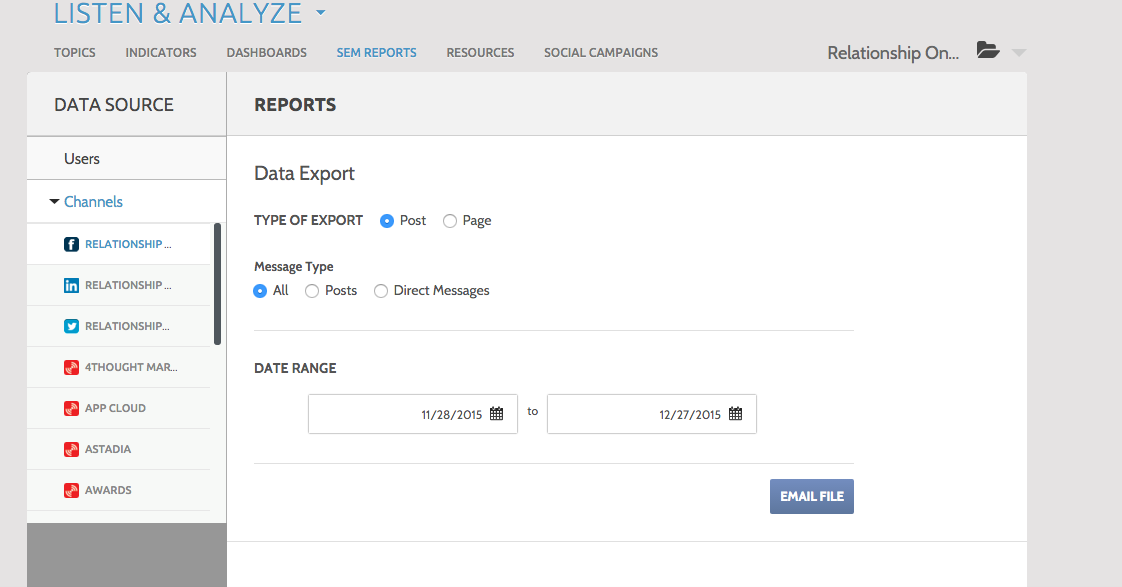
You have the option to select the type of messages you would like to look at along with the date range. Once you get the data down to what you want to see, you can email the file as an excel spreadsheet.The file includes a detailed account of activity with timestamp, channel type, message, attachments, interactions, feedback, etc. The details in these reports are super insightful and are useful for dissecting campaigns, channels, and content.
Speaking of campaigns, this brings us to the final area of Listen & Analyze – Social Campaigns. Oracle defines this function as a way to “narrow your analytical view to see how the Publish posts you published with Workflow & Automation tags are performing.” In my first blog I walked you through creating tags to help organize your posts. This is where tags (e.g. Events, Awards, Blogs, Lead Generation, etc.) come in handy! When you are in Social Campaigns, you can select a tag in the top left. Here is a screenshot of what it looks like when I select Relationship One’s “Blog Posts” Tag.

In the Overview, you can see how many posts have been published by social channel as well as the breakdown, along with the engagement rate of that particular Tag. To the left, you can choose to look at this Tag in more detail by breaking it down by channel. This will allow you to see each individual post in detail along with the specific engagement rate. Again, Tags and Social Campaigns provide valuable insight into engagement trends for certain types of communications or campaigns.
Indicators, Dashboards, SEM reports, and Social Campaigns are ultimately the Oracle SRM tools that help you zoom in on your social media analytics in the most relevant way. I hope my explanation of these areas has helped you to better understand the full functionality of Listen & Analyze. For more information, check out Oracle’s SRM Resource Center.
Check back in early 2016 for my next blog on Oracle SRM’s Engage. Thanks for stopping by and remember to #BeAGoodListener.
Share This
About the Author: Relationship One





