

Last week, Oracle Eloqua announced a significant change to form fields coming in Release 487, scheduled throughout April. To limit security vulnerabilities, Eloqua Oracle will be enabling the “Must contain a valid number of characters” checkbox by default and setting it to a 35-character maximum limit on form fields for all newly created forms.

Then, on April 26th, Oracle Eloqua will alter all existing form fields that have a value less than 35 characters to the maximum character limit of 35.
Holy cow, you say? Yes, that was my first reaction too. The good news is that you have time and a plan of attack. On March 20th, Oracle Eloqua have said they will provide a list of all affected fields to all customers. Please reach out to your Oracle Account Manager or contact My Oracle Support if you do not receive this on March 20th.
Next, any new forms you create after your pod upgrade to Release 487 will have the 35-character form field limit by default. To change this, you will need to adjust each field you wish to receive more than 35 characters. See release schedule below:
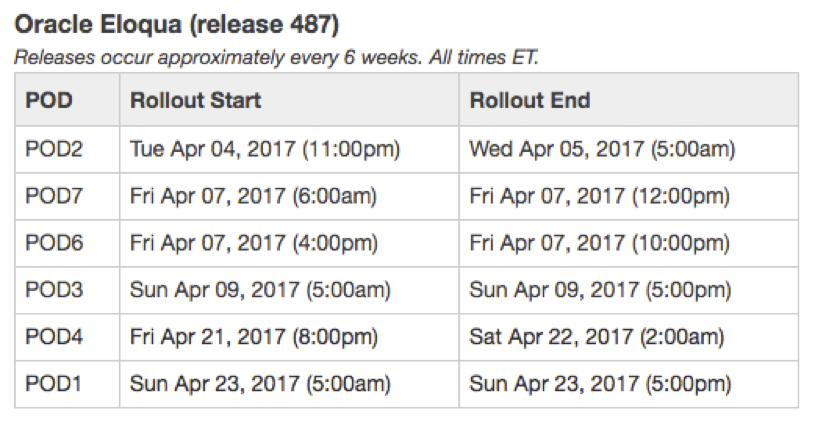
Lastly, audit your existing forms and make your plan to update any existing form fields that you wish to continue receiving more than 35 characters after April 26th, 2017. All existing form fields will be impacted if 90% of the historical data submitted for that field has less than the 35-character length and the maximum character count has not been manually changed.
Please see Oracle Eloqua’s Product Notice on Topliners for more information and FAQs. If you have concerns or need any assistance upfitting your forms, reach out to your Relationship One Account Manager, Consultant or submit a support ticket and we’ll be happy to help make sure your forms are not impacted by this upcoming change.
Share This
About the Author: Emily Eubanks





