

How many of you are in need of a process that helps streamline your events using marketing automation? Eloqua has a built-in event management tool that can help simplify and automate the downstream and communication process you use to promote your events. This tool can assist in managing both simple events and more complex ones. The best part is, the process is replicable and it is already part of your platform.
How does it work?
We all know the basic components of events include: invitation, registration page, confirmation, reminder and then post event emails. With Eloqua, we let automation do exactly what its name implies…automate the process. By using an Eloqua form, you have access to all the normal processing steps that you need to manage the contacts / leads in your system. When you add the event module functionality you have a way to send out customized confirmations, reminders and followup emails to anyone who has registered by using the data that is collected on the registration form. This data is passed to the event module.
Using the event actions, you can control when and how someone receives the downstream communications. There are standard and advanced features in the event actions and each step is customizable and you can add additional processing steps in addition to just emails. You can also control if the event has a max capacity and if you want to automatically disable the services on a certain date.
Here are some examples of how you can provide a personalized experience:
Use field merges that pull in data from either the Event Session Fields or the Event Fields. The Event Session fields contain the details about a particular event session. It includes things like Date, Time, Location. The Event Field is the data you collect on each registration and aligns to the registration form. It includes things like First Name, Last Name, Email Address.
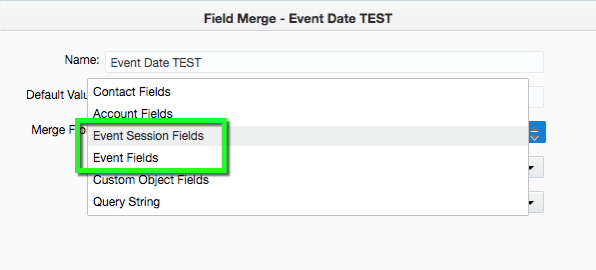
You can also use dynamic content to make your emails more customized.
Where do you start?
For demo purposes I will keep this pretty basic. You will need to create the following assets in Eloqua:
- Registration Form (include some sort of Session identifier if you are hosting a multi-session event)
- Emails (invitation, confirmation, reminder, thank you and sorry we missed you)
- Event Module
- Field merges and dynamic content
How to setup the event module:
Navigate to Orchestration > Tools > Events. Click on the Events drop down and choose New Event Registration. Give your event a name, description and choose the folder you want to save it to.
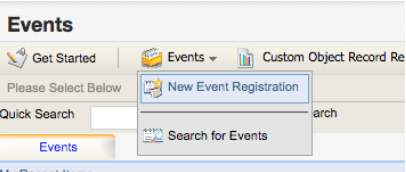
Lets walk through the setup of your event module. Click the Edit button beside each section to make modifications to the details.

Event Overview
You can edit the name and description of your event module
Registrant Info
This contains the registration fields that are linked from the form. You can create additional fields, link forms and assign the Special Fields. There are two Special Fields, Email Address and Unique Identifier. Unique Identifier can be email address, an Eloqua ID or one of your form fields. Use email address if someone can only register one time per session.
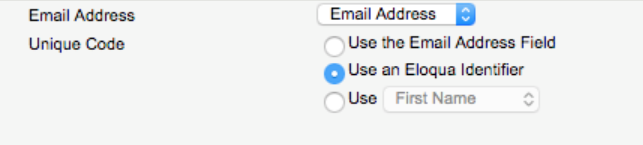
Event Details
This is where you setup the static details of the event for things like venue, date, time, location, speakers, etc. You can also choose if this is a one session or a multi-session event. If you choose multi-session you will need to pick one of the event detail fields that it is organized by. As a standard setup, I always create a field called Session and use that to organize my events.

Event Actions
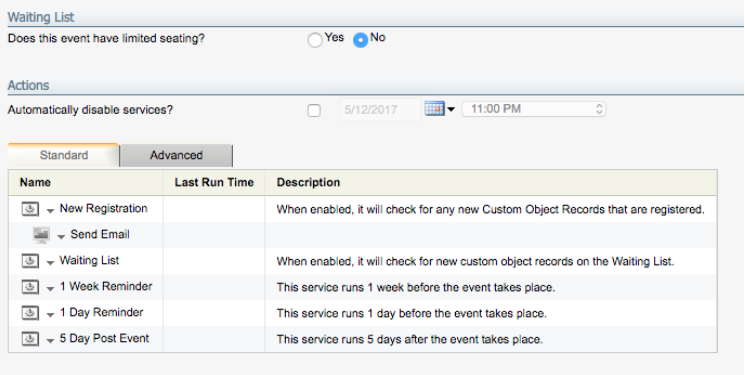
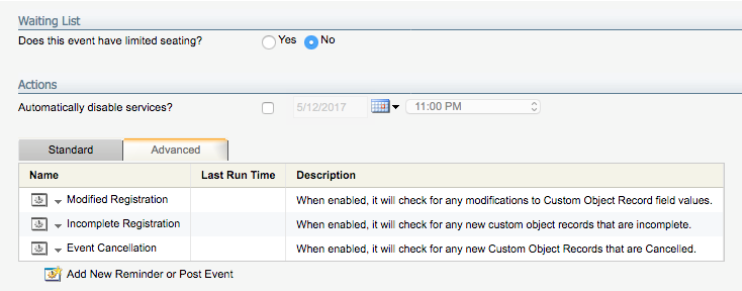
This is where the magic happens and where we enable Eloqua to do our downstream processes once someone registers for our event. Through the event actions you can setup confirmation emails, control when someone receives a reminder email, send out notices to anyone who has been waitlisted, send out notices if the event has been cancelled and send out the post-event communications.
The processing is not limited to sending emails alone. Here is a screenshot of the options available to help manage your registrations.
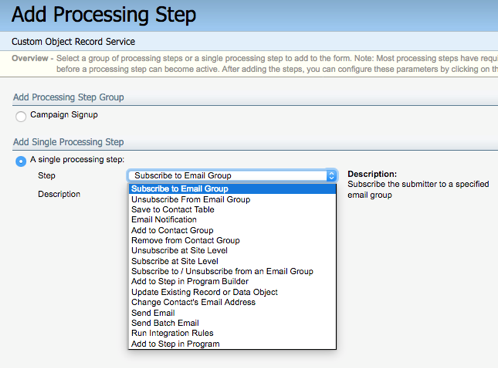
The actions has two tabs, Standard and Advanced. Under the Advanced tab you can add additional actions to manage reminder and post event processing.
Once you have all the actions configured, you will need to enable them by going back to the main view of the event module and clicking Enable beside each action you want to activate. Eloqua system actions run every 15 minutes.

That is the basic setup for using the event module. So the next time you are tasked with managing an event, check out this hidden gem and give it a try.
Ready to set up Events Module in your Eloqua instance but need a little extra support? Let us know! Or maybe you’re already using Events Module and you want to roll it out to a larger group? Tell us about your experience in the comments below or fill out this form and someone will get back to you.
Share This
About the Author: Relationship One





