

Earlier this year, I helped all you social media gurus with LinkedIn advertising capabilities. Now I’m back, because Twitter is no joke when it comes to advertising potential either!
Twitter has exploded into a major platform for business content, networking, and advertising. While many may still argue that LinkedIn is the leader for B2B marketing efforts, it’s important not to discredit Twitter’s power. While it may be more difficult to squeeze your value proposition into 140 characters, this platform is still an easy way to grab your prospect’s attention. So, let’s get to it!
Similar to LinkedIn, Twitter offers multiple options for advertising campaign types. These options include: Website Click Campaigns, Follower Campaigns, Engagement Campaigns, and App Campaigns. I will also be breaking these down for you, using Twitter Business basics.
Twitter Advertising
- Website Clicks Campaigns
“A Website Card is a powerful ad format that allows users to preview an image, related context and a clear call to action in their timeline”
These ads are posted on twitter feeds just as other posts would be. However, the focus of these is the large banner image, with only a short headline to encourage prospects to click and head to a webpage, landing page, etc. There is also an option to set up conversion tracking on and off of Twitter - Followers Campaigns
“Followers are incredibly valuable to your business. When someone follows you on Twitter, they not only see your Tweets, but they’re also likely to become an advocate and customer.”
This one is pretty straight forward. A followers Campaign promotes your business or personal twitter account in the “Who to Follow” panel found on a Twitter timeline. You can also create Tweets with a follow button feature, Twitter suggests using a strong call to action on why people should be following you. - Engagement Campaigns
“People on Twitter love to discover and share interesting content, take part in enthusiastic conversations, and connect with others outside their immediate circles.”
The ads in these campaigns are very similar to Sponsored content in LinkedIn. They look like regular tweets and allow people to interact with them like regular tweets, but are labeled as “Promoted”. The bonus of these ads is they can be hyper-targeted to a specific group of people, at a specific time. - App Campaigns
“Over 83% of Twitter’s users are on mobile and they’re looking for apps to download.”
Similar deal to the Website Card described previously, but featuring your app instead. Include an image, app name and description, app rating, and an install button. As with this one too, include conversion tracking if desired.
At Relationship One, we work mostly with Website Clicks Campaigns. We usually aim to drive people to a specific page on our website, to learn more about a product, RSVP for an event or read a specific piece of content. I’ll break down the ad creation process just as I did for LinkedIn.
Again, make sure that you are set-up as an account contributor for your organization’s Twitter business account. Once you log into your account, you can navigate to Advertising by hovering over your profile icon in the top right and scrolling down to “Twitter Ads”. Once that window opens, click “Create Campaign” in the top right and begin the process:
- Select the type of campaign you’d like to create. In this case, I’ll walk through a “Website Visits” campaign.
- Set up your campaign – name your campaign using a naming convention that will help you easily find ads later. Choose the start and end dates, or have it run continuously if the specific url you will be promoting is evergreen.

- Setup website tag for conversion tracking – if desired.
- Under “Ad Placement”, expand the Twitter Audience Platform options – enter your website’s domain and select a few categories that describe your ad. We typically choose Business and Marketing.This is not for targeting, we will get to that in a few steps.
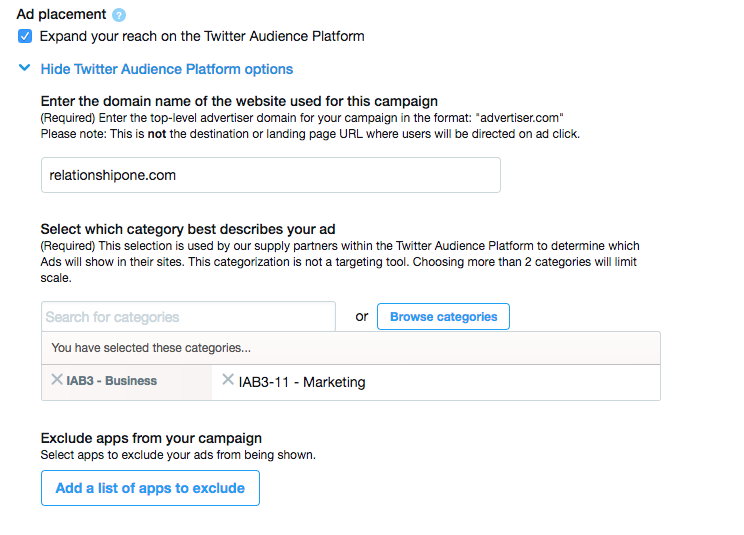
- Exclude apps from your campaign – If you’d like to keep your ad off any specific apps, choose to exclude them here. Good for competition purposes.
- Select your audience – similar again to LinkedIn. You can target based on location, gender, language, devices, keywords, and much more. This section may take a little trial and error during different campaigns.
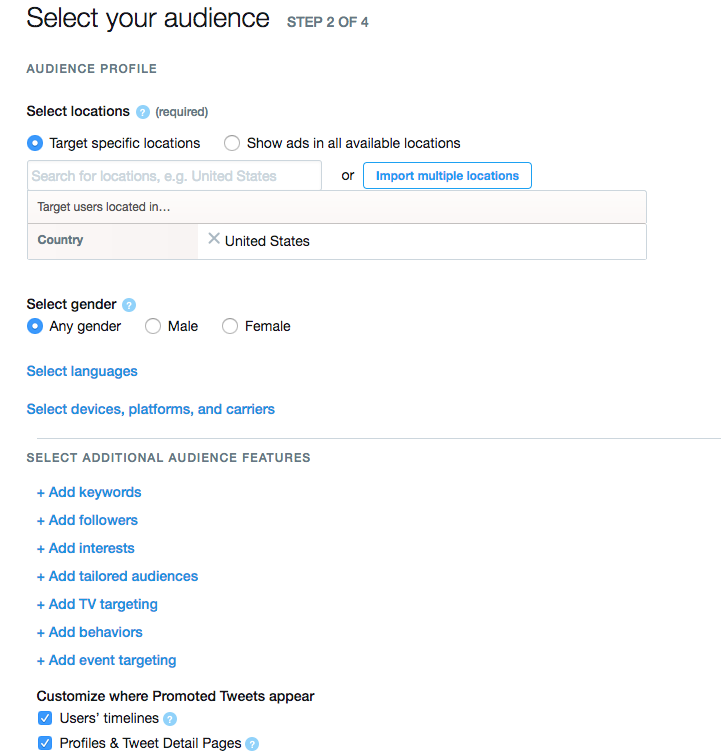
- Customize where Promoted Tweets appear (see bottom of photo above) – we choose both users’ timelines and profiles & tweet detail pages
- Set your budget – up to you for daily and total spend. Relationship One tends to spend at least $100 on a campaign in total, with daily maximum changing based on our timeframe.
*Can change cost per bid or set a maximum, we recommend setting a maximum based on what others are doing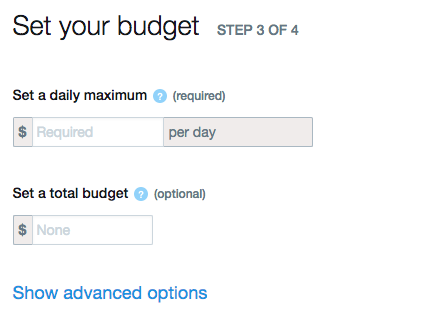
- Choose your creatives – here is where you create the ad itself! Write a normal tweet or create a website card using an image, headline and URL. Twitter provides an option to preview the post/card on iOS, Android, and desktop so you can be sure it is maximized.

It really is that easy, we promise! Creating an ad from one of your past tweets takes seconds, and creating a website card only takes a few minutes thanks to Twitter’s template. And reviewing/testing right inside the platform, how does it get any better?
As with LinkedIn, you get campaign analytics for Twitter ads as well, free of extra charge! Again, you have the capability of looking into each individual campaign to see your impressions, spend, conversions, link clicks, cost per link click, click rate, and much more.
That wraps up our Twitter advertising lesson, I hope the overviews of both LinkedIn and Twitter ads have you feeling ready to jump into Spring with some new initiatives. I merely scratched the surface of what you can really get into with these ads, but hopefully I have given you enough direction to dive into more ad functions yourself or work with an account representative in each platform.
As always, if you have any questions, please feel free to comment below!
If you’re organization is seeking out ways to leverage social media more effectively for marketing, check out Conquering the Social Marketing Frontier with Oracle Social Relationship Management, or contact us.
Share This
About the Author: Relationship One





