

Oracle Eloqua Guided Campaigns continues to enhance how marketers deliver targeted, personalized messaging. Oracle has advanced the functionality of Guided Campaigns since its inception to not only be simpler, but also more powerful. Focused on solving for several key use cases, including nurture campaigns, event marketing, and targeted account selling, Guided Campaigns gives marketers a robust way for sales and revenue team members to utilize branded and personalized content through a self-service portal.
What is Oracle Eloqua Guided Campaigns?
Oracle Eloqua Guided Campaigns is an “Oracle Eloqua app that provides a self-service process for creating brand-approved and personalized, reference-based email campaigns for targeted accounts.” Using Oracle Eloqua’s campaign workflow, segmentation, and email templates, Guided Campaigns provides a streamlined workflow for recommending branded content to a specific target audience. Still not sure what Guided Campaigns can do for you? Let’s break it down with an example use case.
Let’s say that you have a group of field marketers, distributed marketers, channel partners, or even business development reps. You want them to have a self-service way to send personalized content to their target audiences. At the same time, you need to ensure those messages are branded appropriately and messaged accordingly. Marketing needs to control the look, feel, and content. Sales and revenue team members need to trigger the workflow. Guided Campaigns makes that happen “on the fly” increasing relevancy and speed-to-market.
With Guided Campaigns, marketers are in control of creating the content within the emails. Assets and segments can be pre-built in Eloqua, and corporate marketers have the ability to adjust campaigns built by various users. Sales and revenue team members simply log into the Guided Campaigns portal to select their appropriate audience, choose the assets they want sent, define campaign workflow requirements, and send. They also have the ability to add these contacts into campaign workflows, shared lists, or lead routing programs.
How Does it Work?
Once you decide Guided Campaigns is right for you, the first step is making sure you have the right access. Guided Campaigns requires purchased licenses, however, if you have the Standard or Enterprise trim of Eloqua, you are allowed 5 and 10 licenses, respectively. Within the User area of Eloqua, you will see a Guided Campaigns security group and a Guided Campaigns application license. Any individual using Guided Campaigns needs to be assigned the Guided Campaigns security group and given access to the license. Once that’s complete, you will need to install the Oracle Guided Campaigns app. After that, just make sure the Guided Campaigns security group is given permission to view your standard contact view (for audience viewing in Guided Campaigns) and permission to view any email templates they will access in their campaigns.

Once all proper permissions are allocated and apps configured, you’re ready to think about your use case(s). Defining your use case is critical as it will impact your content, configuration, and governance of the Guided Campaigns workflows. Be sure to spend time with your marketing and revenue teams to define clear objectives, audiences, and reporting requirements before getting started.
There are a few key pieces of content that need to be developed by your marketing team before campaigns are ready to be built and sent through Guided Campaigns. Keep in mind that Guided Campaigns uses assets pre-built within Eloqua. Your sales and revenue teams are selecting these pre-built assets when they build their workflows. Although your users will have the ability to upload contact lists for their audience and create new emails directly in Guided Campaigns, marketers still need to define pre-built email templates. As you plan, keep in mind the four key tactics (marketing campaign types) that Guided Campaigns supports: Simple Email, Multi-Step Nurture, Event Promotion, and Targeted Account Selling.

Single Email
The Single Email tactic is designed for straightforward, one-time email sends. This campaign is ideal for quick announcements, time-sensitive promotions, or when users need to reach a specific audience with a single message. Users simply select their target audience, choose an existing email (or create a new one using a pre-approved template), and schedule the send date and time. This tactic minimizes complexity, making it easy for users to execute targeted email campaigns with minimal effort. As with all Guided Campaign tactics, users can choose to push contacts into a shared list, another campaign, or program once they complete workflow.
Multi-Step Nurture
The Multi-Step Nurture tactic allows for the creation of an email nurture sequence. Users can design a series of up to five emails to be delivered to your target audience over a specified timeframe. All contacts will receive each email, and users can accelerate the delivery of those emails based on engagement. This approach enables users to gradually educate and engage prospects, building relationships and guiding them further down the sales funnel. By defining engagement criteria, users can accelerate the delivery of subsequent emails for highly engaged prospects, while maintaining a consistent cadence for others.
Event Promotion
The Event Promotion tactic enhances the process of generating excitement and driving attendance for upcoming events. This tactic typically involves a two-step email sequence: an initial invitation email followed by a timely reminder. With this workflow, a custom object in Eloqua is required to capture and check for registrations, ensuring the follow-up is only sent to non-registrants. Like other tactics, users can easily select their target audience, choose or create compelling email content, and schedule the delivery of both emails. This automated approach ensures timely communication, maximizes event visibility, and increases the likelihood of attendees registering and participating.
Targeted Account Selling
The Targeted Account Selling tactic is designed to engage specific accounts with a personalized and impactful approach. This tactic typically involves a two-step email sequence. The first email aims to capture the attention of key decision-makers within the target account. The second email, triggered by engagement with the first email (defined by the user and typically includes actions such as an email open or click), delivers a more personalized message tailored to their specific needs and interests. Depending on engagement, an automatic opportunity qualification program can be integrated to route engaged contacts to the sales team for follow-up and potential conversion. Note: Oracle CX Sales is required for automatic opportunity qualification.
How Do Users Create Campaigns?
Campaign Selection & Setup
The first step in creating a campaign with Oracle Guided Campaigns is to select a tactic that aligns with marketing objectives. As we have reviewed, options include Single Email, Multi-Step Nurture, Event Promotion, and Targeted Account Selling. Each tactic provides a pre-defined workflow optimized for specific campaign goals. Once a tactic is chosen, users provide a clear name and description for the campaign for easy identification and future reference. The system then guides them through a series of steps specific to the chosen tactic.
Define Target Audience
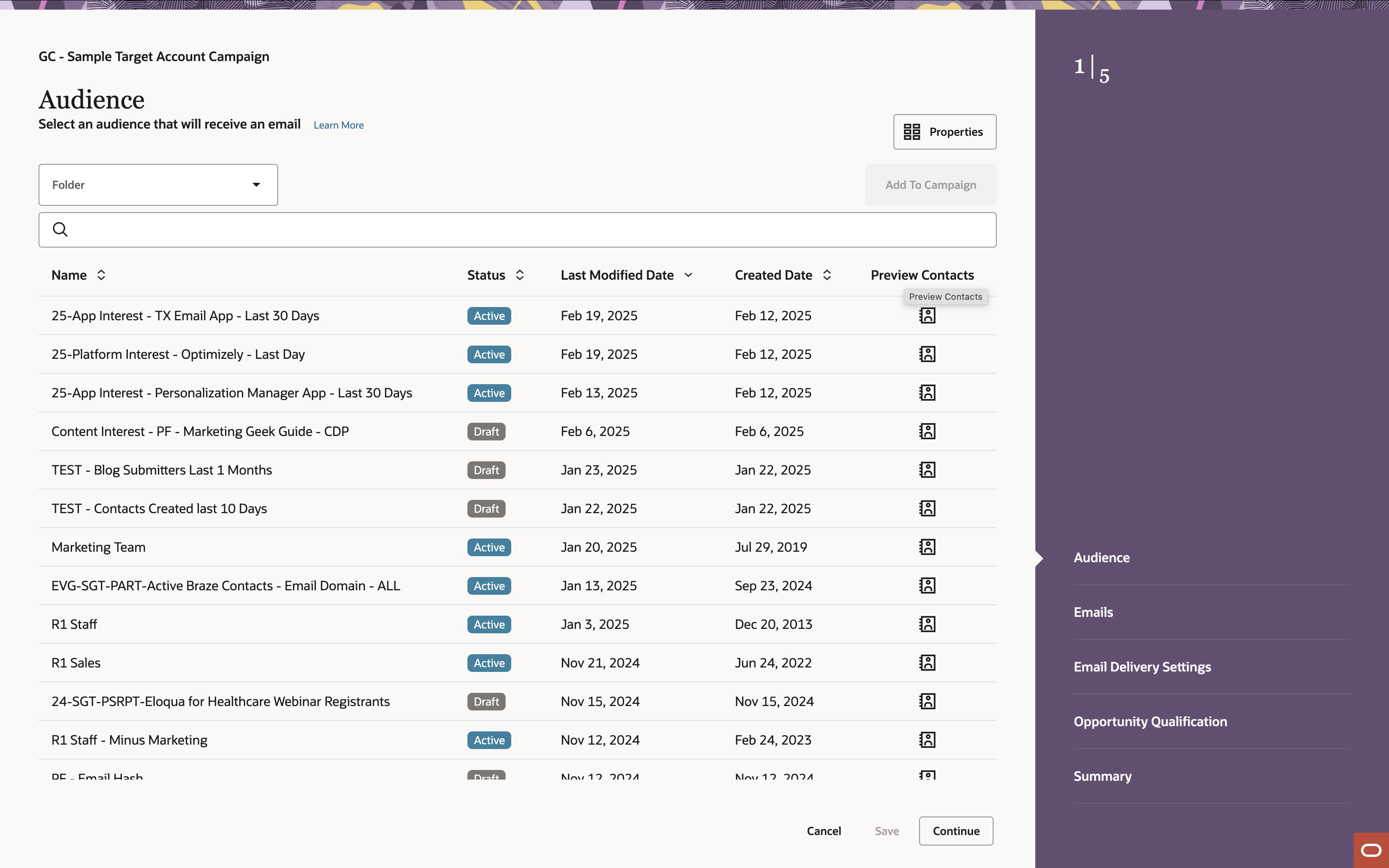
Precisely defining a target audience is crucial for campaign success. Users can select a pre-existing audience segment within Eloqua based on criteria such as demographics, firmographics, behavior, and engagement history. If necessary, users can also upload a list of contacts directly into Guided Campaigns to target specific individuals or groups. Note that only users that have explicit permissions to upload lists in Guided Campaigns will see the option to do so. Uploaded lists can be created as new segments in Eloqua or contacts can be added to existing ones. In both scenarios, users will need to map CSV data to pre-existing fields within Eloqua. Note: Contact Level Security permissions apply to Guided Campaigns in the same way it applies within Eloqua. Users will only see the contacts to which they have access.
Select or Create Emails

The next step involves selecting or creating the email(s) that will be used within the campaign. Users can choose from existing emails within Eloqua or create their own. New emails are created using a pre-existing email template within Eloqua that has been designated for use in Guided Campaigns. To enhance engagement and relevance, users can configure signature rule details within the Guided Campaigns interface. Lastly, depending on which tactic is chosen, users can set the rules for multiple email delivery along with engagement criteria for advancement.
Schedule Delivery
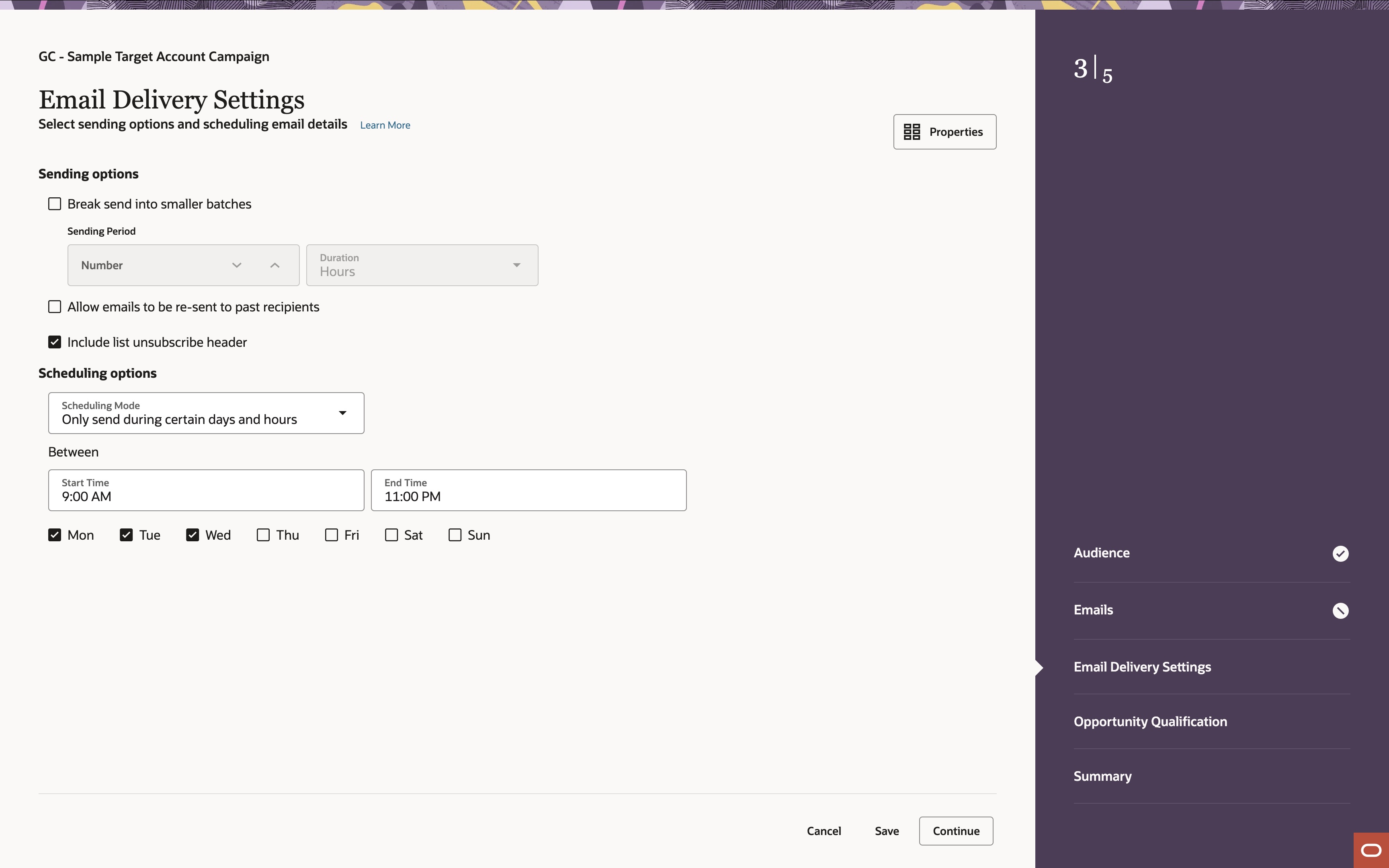
Users can determine the optimal delivery schedule for their campaign. This includes setting start and end dates for the campaign that will ensure timely delivery. The time zone for delivery will be set based on the time zone of the campaign. This can be changed in the campaign properties. Within Guided Campaigns, users are also given a number of sending options, including breaking email sends into smaller batches, allowing emails to be sent to past recipients, and including list unsubscribe headers.
Configure Post Actions (if applicable)
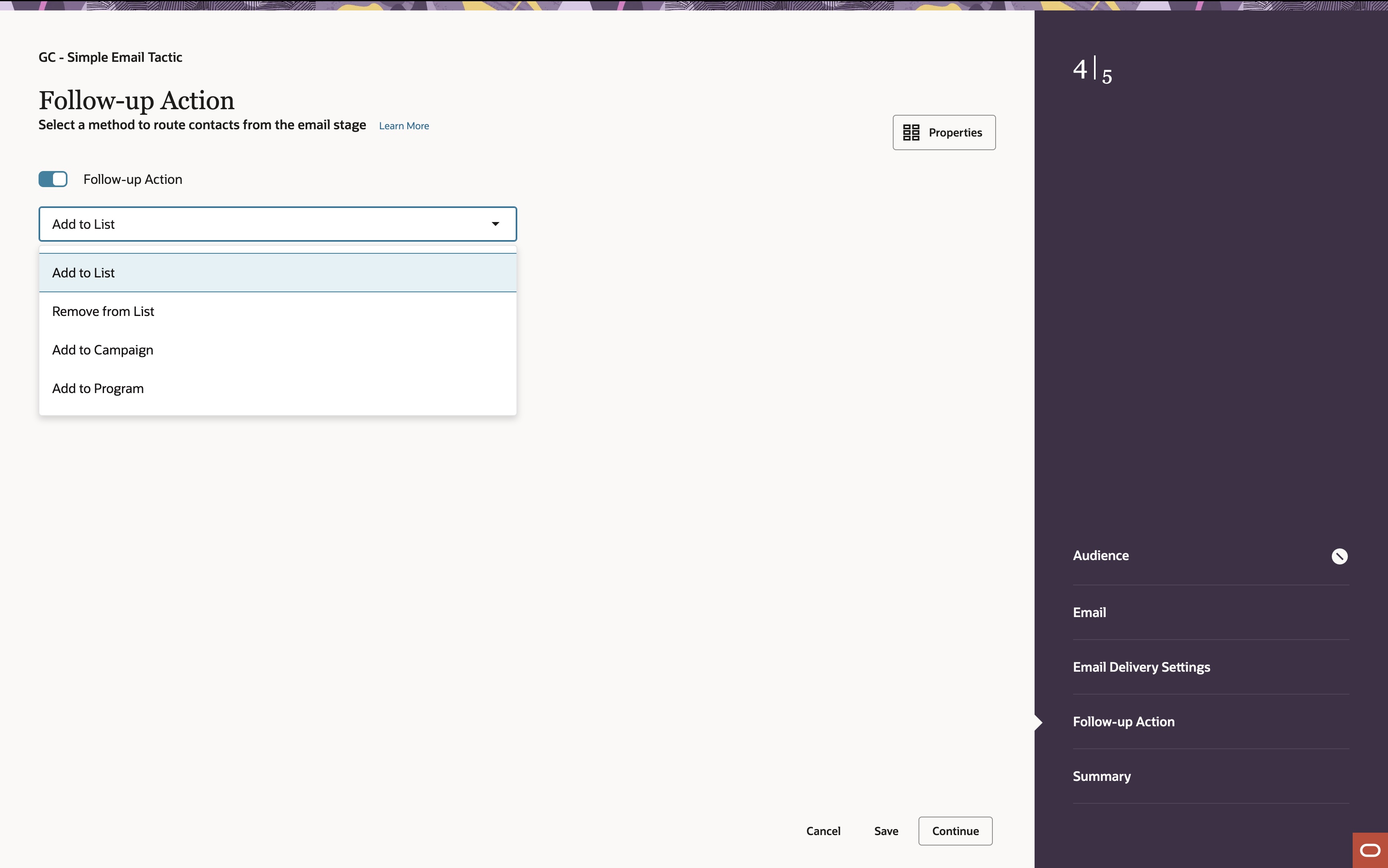
In addition to the campaign workflow set, users can configure desired follow-up actions to occur after the final email stage. These actions may include adding (or removing) contacts to a shared list, routing them to another nurture campaign, or pushing them into a lead qualification program. For targeted account selling campaigns, additional options will be required for automated routing.
Review, Test, and Activate

Before launching their campaign, users should conduct a thorough review of all settings, including target audience, email content, delivery schedule, and automation rules. Users should perform test sends to ensure proper delivery and functionality. It’s also important for users to review the Campaign Properties, ensuring all required campaign fields are completed. Campaigns will not launch until this is complete. Once they are satisfied with the campaign setup, they can activate it to initiate the campaign being created within Eloqua.
Monitor, Analyze, and Optimize

Users can continuously monitor their campaign performance by tracking key metrics such as email open rates, click-through rates, conversion rates, and other key data by using Guided Campaign’s built-in dashboards. Here, they can analyze the results to identify areas for improvement and gain valuable insights into campaign effectiveness. Since all Guided Campaigns are created within the Oracle Eloqua instance, users and marketers with access to the platform can also view results within Eloqua through Operational Reports and Insights. If campaigns need to be adjusted mid-flight, marketers with Eloqua access have the ability to deactivate, optimize, and reactivate.
Dive In to Guided Campaigns
Oracle Eloqua Guided Campaigns simplifies campaign creation and execution for users across the organization. This user-friendly approach empowers both marketing and revenue teams to independently create and launch targeted campaigns, increasing efficiency and agility. Beyond streamlining campaign creation, Guided Campaigns fosters greater collaboration between marketing and revenue teams. Teams can easily access and utilize campaign assets, such as personalized emails and targeted content, to engage with prospects and accelerate the sales cycle. This increased collaboration ensures alignment between marketing and sales efforts, ultimately driving revenue growth.
Are you ready to explore all that Oracle Eloqua Guided Campaigns can offer you and your team? If so, give Relationship One a call.

Share This
About the Author: Melissa Santos





