

 Mickey Mouse. Nonya Business. Bleepity Bleep. Bogus form submissions are the bane of a marketer’s existence. We work hard to create and promote good content and are often rewarded a database full of bad leads due to submitters giving us invalid information. Unfortunately, when a human is submitting bad data, there’s not a whole lot we can do to stop it other than having another human look through the submissions and weed out those that are obviously junk.
The larger nemesis to our forms is the dreaded bot submission. This is where a malicious program finds our form, captures the back-end form fields and submit-action then floods our form with phony data submissions. Sometimes it’s as though the very moment we launch a new form some evil genius finds it and starts hammering away with bogus submissions. The good news is that there IS something we can do about it. Caveat: the solutions I’ve described are written in the context of using Oracle Eloqua forms, but they can be applied generically by ignoring the terms marked with an asterisk (*).
One of the easiest things to do is to place a hidden field as a ‘honeypot’ field on existing forms or any new forms you create. You can name the field something like ’s_email’ (spam email), but don’t use the word ‘spam’ in the field or html name. The bot creators are smart enough to avoid any field with the word ‘spam’ in it. When a bot fills out a form, it populates every field on the underlying form code. Your true form submitters won’t see this field, but a bot will, and it will be populated. Set up a shared list* to capture anyone who has that field populated. In your form processing steps*, add people to your shared list* if that honeypot field has any data in it. Then, you can suppress anyone in that contact list from entering your CRM update program*, lead scoring*, or any other maintenance programs. You should also delete these contacts from your database on a regular basis.
But what if a bot has already hit your existing forms? The first thing you need to do is analyze the form submission data. What patterns exist? What can you do to your forms or within client-side validation code to mitigate bot submissions?
Take a look at the following sample data taken from a real customer who had a big bot problem:
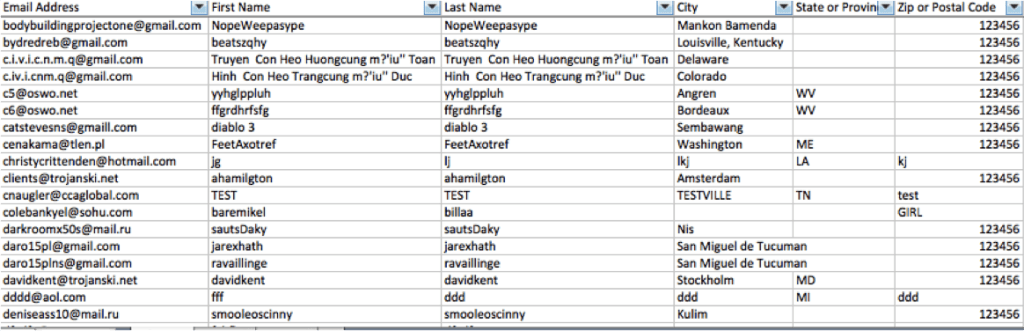
Notice anything we could use to weed out these submissions?
Let’s look at the name fields. Right off the bat, we see that there are form submissions that have the same value in the first and last name fields. I don’t know of a single person named Bob Bob. Do you? We can add “first name = last name” to our list of rules we want to put in place to suppress bad data submissions.
Still looking at those name fields, we may also want to suppress anyone who has TEST as their first or last name. Be careful with this one, as ‘test’ can also be part of a larger name for a valid contact. We can suppress any first or last name with a number in the field, as that is generally an indication of invalid data. Lastly, we may want to consider suppressing anyone with the same letter 3 times in a row, or names with ‘asdf’, or ‘jkl;’ — essentially anything you can recognize as a pattern in the data that is clearly fake.
Now, let’s look at the Zip Code field. You’ll notice that most of the bot submissions have a value of 123456. There is not a state or province in the world that has this sequential value, so this could be used to identify and suppress the bot submissions. Additionally, zip codes containing all letters could be suppressed, as all world postal codes either contain all numbers or a combination of numbers and letters. A neat, random fact: the zip code ‘12345’ belongs to the world headquarters of General Electric in Schenectady, New York, so unless your form submission with that zip code is someone from General Electric, it’s bogus.
It is worth investigating your Comments text field as well. Many bot submissions include a live web link in the comments. Would a real person include a link to a website page in their comments? If yes, then maybe you don’t want to suppress based on the presence of a link, but if not, you may have just found another validation rule to include on the form.
Another question to ask yourself: Can you block by IP address or domain? Many bot submissions tend to generate from servers in Eastern Europe. If you are not doing business in countries where you see your bot submissions generating, you can use IP and domain information from your tracking scripts or your website analytics to block submissions from those countries.
You can set up many of these validation rules within your form processing steps, but remember that the submissions will still be captured in your marketing database, and you’ll need to periodically purge them. This is a great first step to decrease bot submissions, but be aware that it may not be enough. If you find you need more advanced rules, you will need to work with a web developer to create validation scripts on your website and form landing pages. An advantage to using a client-side script is that it will not allow the form to be submitted if it does not pass all of your validation rules. This keeps your database cleaner because bogus data attempts simply will not submit.
I still find it sad that we have to continually find ways to outsmart those rushing to do evil, but at least bot submissions are fairly consistent. As bot creators try to find ways around our validation rules, we simply keep a close eye on our data submissions to continue plugging the holes they find to exploit. Now, if only we could get our real form submitters to stop saying they’re giant rodents who live in sunny Florida.
Share This
About the Author: Emily Eubanks