Now that you’ve meticulously planned for your Optimizely Content Marketing Platform (CMP) implementation, you’re poised to unlock its full potential. Remember, investing time upfront in a thorough audit of your current campaign processes, content workflows, and categorization methodology will lay a strong foundation for a seamless and successful implementation.
The discovery phase is paramount. It’s your opportunity to define clear objectives and ensure that CMP perfectly aligns with your overarching content strategy. A well-defined content workflow and architecture, including a robust taxonomy and metadata strategy, are crucial for effectively organizing and managing your content within the platform. This structured approach will empower you to find, repurpose, and analyze your content assets.
With a comprehensive understanding of your requirements and a well-defined implementation plan, you’ll be equipped to confidently configure the platform and seamlessly integrate it with your existing marketing technologies. This proactive approach will not only save you valuable time and resources during implementation, but also ensure a smooth and efficient transition. By prioritizing thorough planning and a phased approach, you’ll be well-positioned to maximize the benefits of Optimizely CMP and achieve your content marketing goals with greater speed and agility. Now, it’s time to get our hands on the keyboard.
Preparing for Configuration
Implementing Optimizely CMP is an exciting journey that empowers your team to streamline content workflows and achieve greater marketing success. To ensure a smooth and successful implementation, careful consideration must be given to several key areas.
Start by establishing a robust foundation within the platform. Define a clear organizational structure that mirrors your team’s needs. Carefully define user roles and permissions to ensure the right individuals have access to the appropriate tools and information. Configure workflows to efficiently guide content through the creation and approval process, ensuring timely delivery and maintaining high quality.
A well-defined taxonomy and metadata structure is crucial for organizing and easily finding your content. This enables you to quickly search, filter, and report on your assets, gaining valuable insights into your content performance. Create templates for different content types to streamline the creation process and ensure consistency across all channels.
Integrate Optimizely CMP with your existing marketing technology stack, such as your CRM and analytics platforms. This seamless data flow provides valuable insights into audience behavior and campaign performance, allowing you to make data-driven decisions and optimize your content strategy.
Collaboration is key to a successful implementation. Involve content strategists to define the taxonomy, metadata structure, and content calendar. Leverage the expertise of consultants or technical teams for initial setup, integrations, and ongoing platform maintenance. Marketing operations and project managers play a vital role in overseeing the implementation process, ensuring it stays on track and within budget.
Invest in thorough training for your content creators and editors, empowering them to effectively utilize the platform’s features, create content using templates, and participate smoothly in workflows. Keep your executive sponsors informed of the progress and the tangible benefits of the implementation, showcasing the value of this investment.
With careful planning, effective collaboration, and a focus on continuous improvement, you’re ready to unlock the full potential of Optimizely CMP. This powerful platform will empower your team to create exceptional content, deliver it seamlessly across all channels, and achieve your marketing goals with greater speed and agility. Let’s dive deeper into some of the specifics.
Setup Your Organizational Settings
Within Optimizely CMP’s organizational settings, several key configurations are necessary to establish a foundation for effective content marketing operations. The General tab includes fundamental settings like the organization’s name, default region, language preferences, and other important features. For example, you will see options related to campaign and content settings that impact various aspects of the platform.
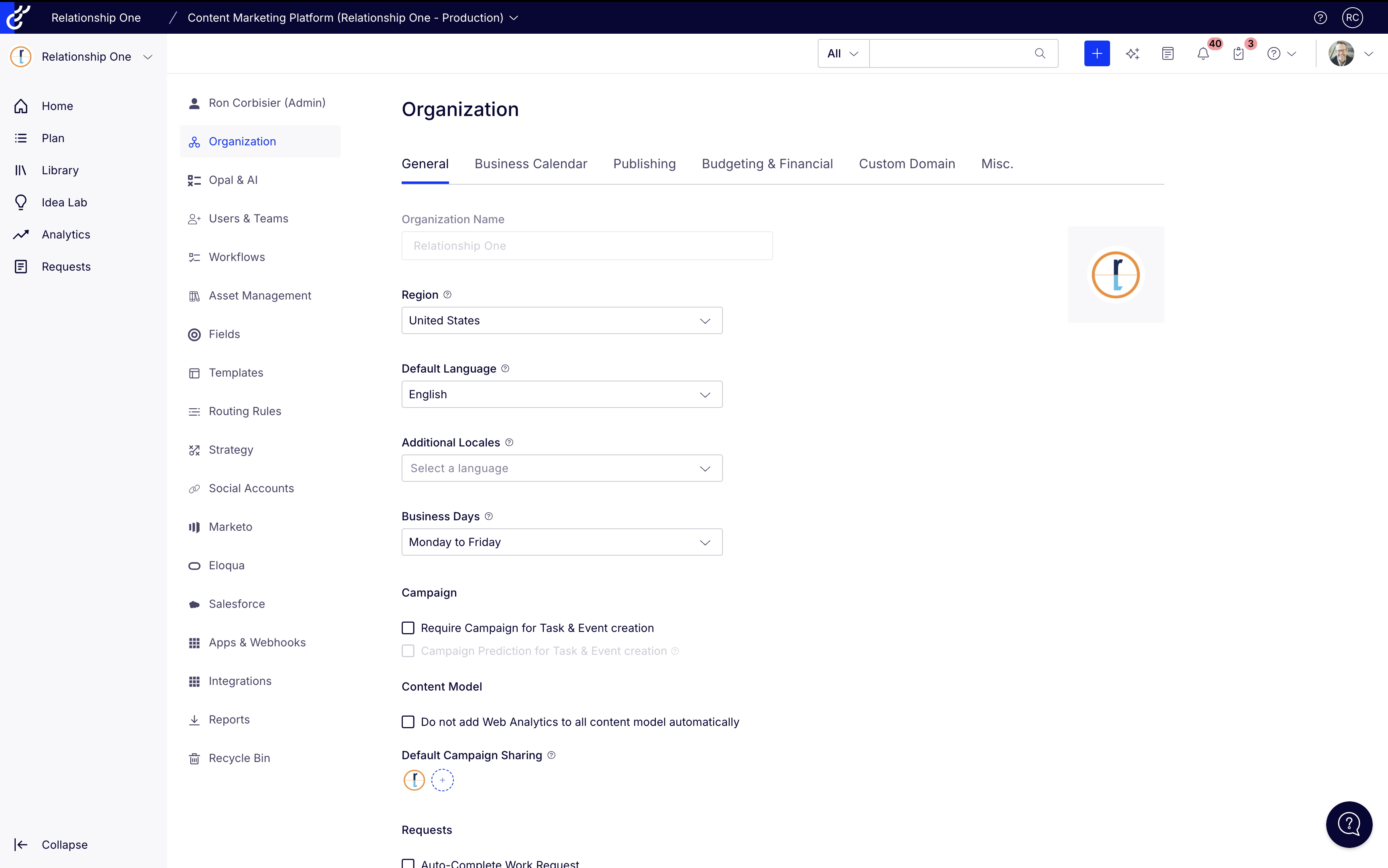
Organizational settings also include options for managing business calendars, budgeting, and custom domains. The business calendar tab allows you to define working days, holidays, and other non-working periods that affect content scheduling and workflow management. This ensures that deadlines and timelines are realistic and account for any planned time off. The budgeting tab, enables you to set up and manage budgets for different content initiatives or campaigns. By configuring these aspects of organizational settings, you gain better control over resource allocation, scheduling, and financial planning related to your content marketing efforts.
Custom domains within Optimizely CMP allow you to brand your content and present a consistent online presence to your audience. First, you’ll need to decide on the subdomain or domain you want to use (e.g., content.relationshipone.com). Then, you will need to ensure that your subdomain is properly configured to work within CMP. Once everything is set up correctly, your content hosted within Optimizely CMP can be accessed and shared using your custom domain.
Using a custom domain offers several advantages. It enhances brand recognition and builds trust with your audience, as they’ll see your familiar domain name associated with your content. A custom domain also provides a more professional and seamless user experience, as it integrates your content more naturally into your overall online presence. Furthermore, using your own domain can have SEO benefits, as it allows you to build authority and link equity on your primary domain, potentially improving your search engine rankings. By properly configuring and utilizing custom domains, you can leverage Optimizely CMP to deliver a branded and engaging content experience that aligns with your overall marketing strategy.
Configure Your Users and Roles
Managing users and roles within Optimizely CMP is crucial for controlling access to the platform and ensuring efficient collaboration among team members. The configuration process involves creating user accounts and assigning them specific roles based on their responsibilities and required level of access. Administrators have the ability to create new users, modify existing user profiles, and manage role assignments. When creating a user, you’ll need to provide information such as their name, email address, and role (to grant them the necessary permissions within the platform).
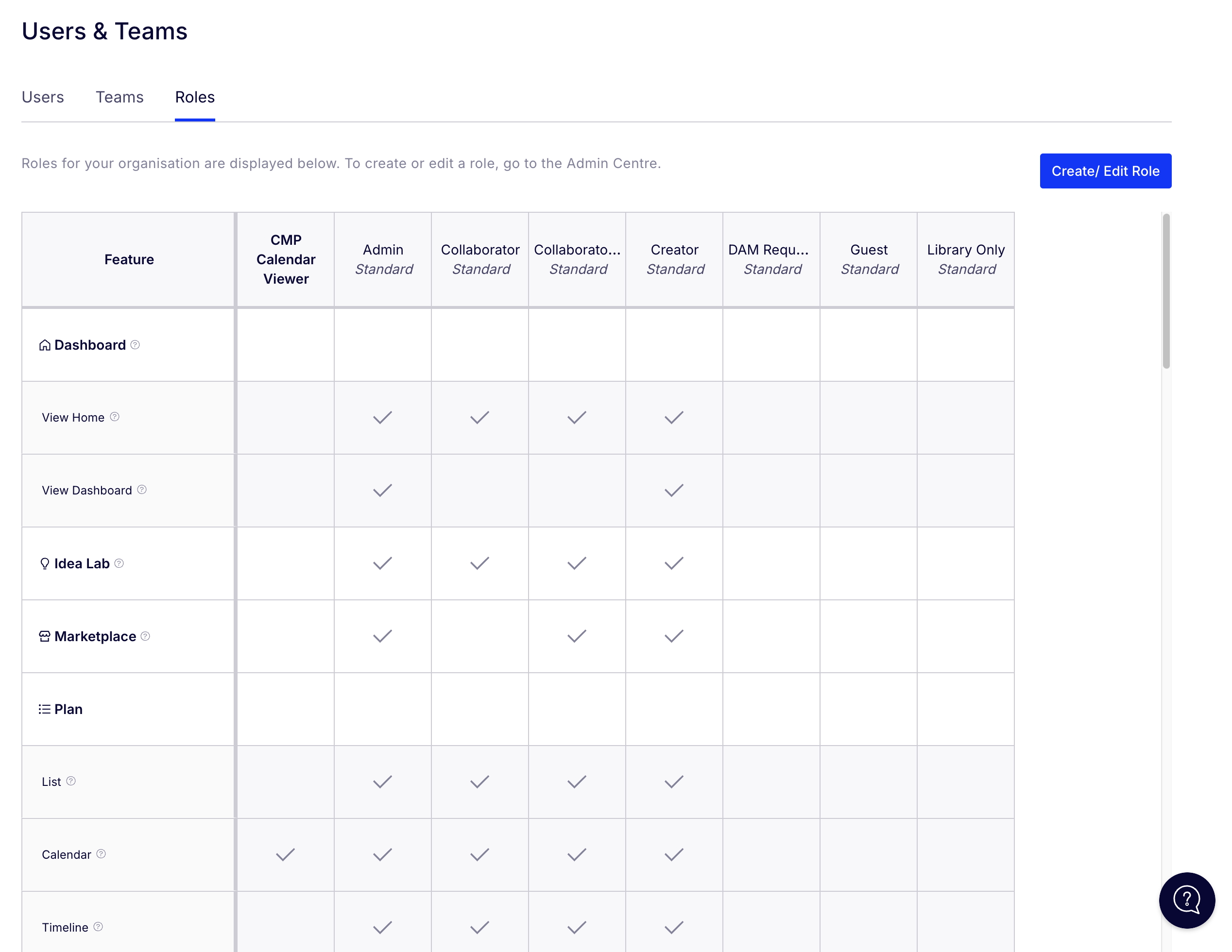
Optimizely CMP comes with a set of standard roles designed to cover common user responsibilities. These include roles such as Administrator, Creator, Collaborator, Collaborator+, and Guest among others. The Administrator role has full access to all features and settings within the platform, including user management, configuration, and reporting. Creators have access to all platform areas, and they are able to create new campaigns, tasks, and events. Collaborators have stricter access, and they can only view and collaborate on campaigns and tasks shared or assigned to them. Collaborators+ have additional access than standard Collaborators, including access to areas such as Idea Lab, Calendar, and Library, and they have the ability to upload directly to the Library. Guests have restricted access and can only access requests from the navigational panel.
In addition to standard roles, Optimizely CMP allows you to create custom roles that meet your specific organizational needs. This gives you the flexibility to define very specific sets of permissions tailored to particular job functions or workflows. By combining standard and custom roles, you can effectively manage user access and permissions within Optimizely CMP, ensuring that everyone has the right level of access to contribute to your content marketing success.
Define Your Fields, Labels, and Taxonomy Structure
A critical aspect of setting up Optimizely CMP is establishing a well-defined taxonomy. Taxonomy refers to the structured classification of your content, using fields and labels for organization and easy searching. A robust taxonomy is essential for content discoverability, both internally for your team and externally for your audience. This process involves identifying the key themes, topics, and attributes relevant to your content. For instance, an e-commerce company selling apparel might categorize content by product type (shirts, pants, dresses) and style (casual, formal, athletic). Implementing a consistent taxonomy ensures that content is easily findable within the platform and improves search engine optimization (SEO) by providing clear signals to search engines about the content’s subject matter.
When building your taxonomy structure, it’s important to keep in mind the difference between fields and labels (labels are a field type). Within Optimizely CMP, fields and labels play crucial roles in organizing and categorizing content, tasks, and campaigns. Fields are structured data points that provide specific information about an item, such as “Author,” “Project,” “Due Date,” and “Budget.” They act as containers for metadata, allowing for the collection and storage of precise details. Fields can be of various types, including text, number, date, dropdown, and checkbox, enabling the collection of data in specific formats. This structured approach allows for powerful filtering, sorting, and reporting capabilities, as data can be easily queried and analyzed based on specific field values.
Labels, on the other hand, are less structured and more flexible. They are simple tags or keywords assigned to items for broader categorization and quick filtering. For example, a blog post might be labeled with “SEO,” “Social Media,” and “Marketing.” Labels are ideal for general categorization and grouping of items based on overarching themes. While less structured than fields, labels provide valuable organizational benefits, allowing for easy identification and filtering of items based on shared characteristics. By effectively utilizing both fields and labels, users can create a well-organized and efficient workflow within Optimizely CMP, improving content management, collaboration, and overall productivity.
Structure Your Workflows and Routing Rules
Within Optimizely CMP, workflows and routing rules are powerful tools for automating and streamlining content creation and approval processes. Workflows define a series of sequential steps that content must pass through before it’s published. These steps can include tasks like drafting, editing, legal review, and approval. Each step can be assigned to specific team members or roles, ensuring that content is reviewed and approved by the appropriate individuals. Workflows can be customized to fit the specific needs of different content types and teams, ensuring that all content follows a consistent and efficient approval process.
Routing rules, on the other hand, determine how content is assigned to specific team members or groups based on predefined criteria. For example, a routing rule can automatically assign blog posts to the editorial team, while website updates are routed to the web development team. Routing rules can be based on various factors, such as content type, author, or specific field values.
The relationship between workflows and routing rules is synergistic. Routing rules can be integrated into workflows to automate the assignment of tasks at specific stages. For example, a workflow for blog posts might include a step for “Editorial Review.” A routing rule could be configured to automatically assign blog posts to the appropriate editor based on the post’s topic or target audience. This integration streamlines the workflow and ensures that content is efficiently routed to the correct individuals.
In structuring workflows, it’s crucial to clearly define the necessary steps and their order. Consider factors such as the complexity of the content, the number of stakeholders involved, and the desired level of control. Break down the workflow into manageable stages and assign clear deadlines for each step. Routing rules should be carefully defined based on the specific needs of your team and the types of content you create. Consider factors such as content type, urgency, and the skills and expertise of your team members.
Within Optimizely CMP, work requests and forms are also beneficial for managing requests from various departments and teams, and they can be built into your workflows. Once a work request is submitted, it can be integrated into existing workflows or trigger the creation of new ones. For example, a website update request might trigger a workflow involving design, development, and QA testing. This integration ensures that ad-hoc requests are handled efficiently and consistently within the overall content management process, maintaining order and preventing bottlenecks.
Build Your Campaigns
Campaigns and tasks are core components within Optimizely CMP for organizing and executing marketing initiatives. Campaigns represent overarching marketing efforts with defined goals and objectives, such as a “Summer Sale” or “New Product Launch.” They act as containers for managing all related activities and resources. Tasks, on the other hand, are the individual action items that contribute to the campaign’s success. These smaller, more specific activities, such as “Write blog post” or “Design social media graphics,” are essential for achieving the campaign’s objectives. Campaigns and tasks have a hierarchical relationship, with campaigns encompassing a collection of related tasks. This structure allows for efficient planning and execution of marketing projects, ensuring that all activities contribute to the overall campaign goals.
To create a campaign, begin by defining clear goals and objectives. Identify the key activities required to achieve these goals, which will form the basis for your tasks. Within Optimizely CMP, create a new campaign and provide a descriptive name and a brief description. Subsequently, add individual tasks within the campaign, assigning them to specific team members and setting deadlines. Throughout the campaign, monitor the progress of each task, identify any roadblocks, and make necessary adjustments. Upon completion, analyze the campaign’s results to evaluate its effectiveness and identify areas for improvement.
Creating campaign templates can significantly streamline the campaign creation process. To create a template, develop a sample campaign that represents a typical workflow for a specific campaign type, such as a product launch. Define the template name, description, and any default settings, such as task assignments and deadlines. Save this sample campaign as a template within Optimizely CMP. By utilizing these templates, you can quickly create new campaigns based on proven structures, ensuring consistency and efficiency across your marketing efforts.
Get Ready to Publish
The publishing feature within Optimizely CMP streamlines the process of delivering content to various channels. It allows you to publish content directly from the CMP to your website, social media platforms, and other destinations. This centralized approach eliminates the need for manual exporting and importing of content, saving time and reducing the risk of errors.
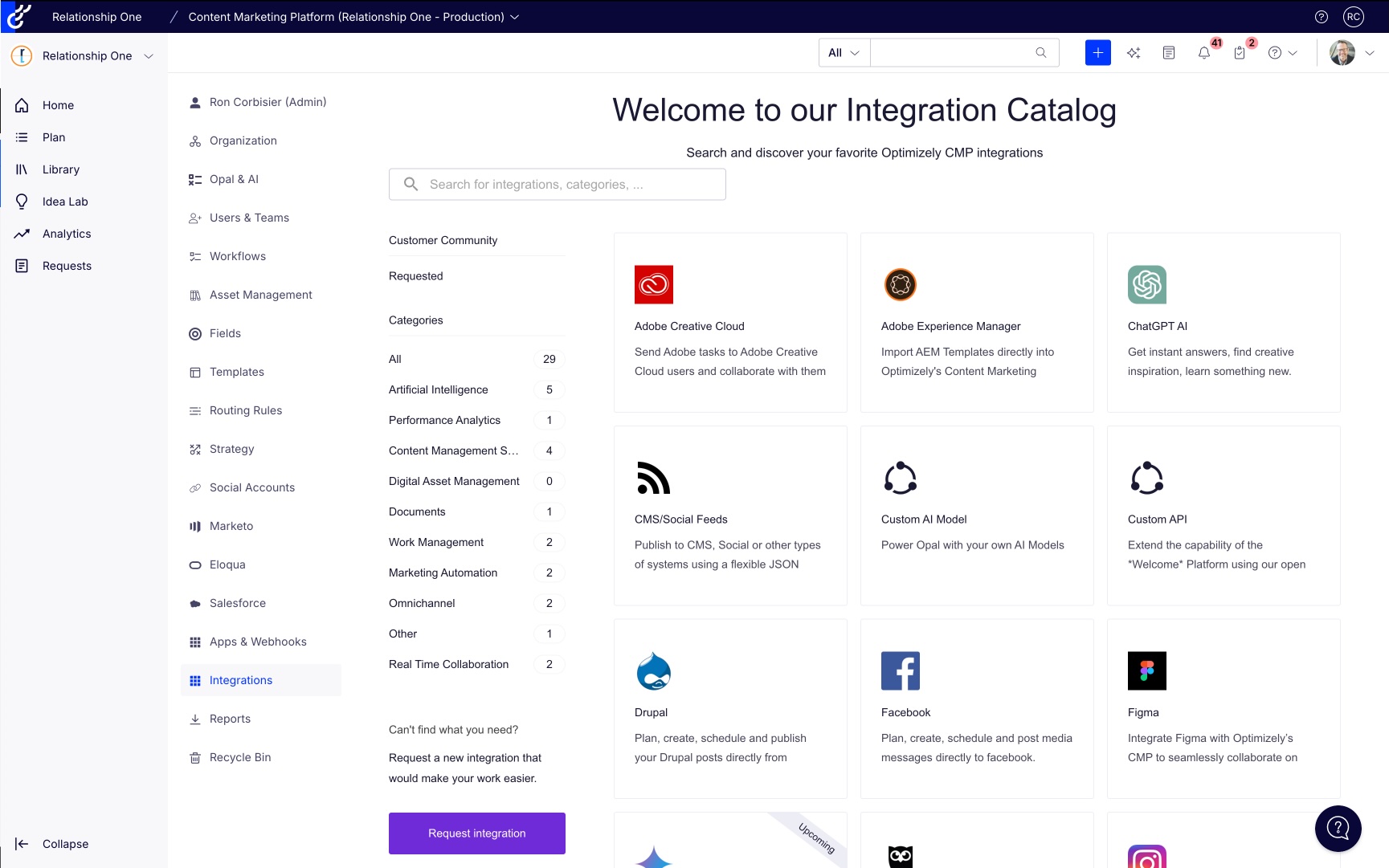
To connect various technologies, Optimizely CMP offers integrations with a wide range of platforms, including CMS systems like WordPress and Drupal, social media platforms like Facebook and Twitter, and email marketing platforms such as Adobe Marketo. These integrations enable you to publish content directly to these tools from within the CMP interface. For example, you can publish a blog post to your WordPress site with a single click, ensuring that the content is published consistently and accurately across all channels. Every publishing channel has different requirements for integration and capabilities, so plan ahead to keep your implementation seamless.
By leveraging the publishing features within Optimizely CMP, you can streamline your content workflow, improve efficiency, and ensure that your content is delivered to the right audiences at the right time.
Get Started!
Optimizely CMP is a powerful tool, and its effectiveness hinges on a solid implementation. Instead of sprinting out of the gate, adopt a “crawl, walk, run” approach. Start by configuring core functionalities: define essential fields, create basic workflows, and establish clear user roles and permissions. This foundational phase ensures a stable and reliable system. Once comfortable with the basics, gradually introduce more advanced features, such as complex routing rules, integrations with other systems, and advanced reporting. This gradual approach allows your team to adapt and learn at their own pace, minimizing the risk of errors and maximizing the return on your investment.
If you’re considering an Optimizely CMP implementation, and you’re looking for a partner that can strategize, implement, and scale your investment for the future, reach out to Relationship One. We are here to help.

Share This
About the Author: Melissa Santos