

I’ll set the stage.
It’s nearing the end of the fiscal year, 8 am, and you’ve taken your seat in a large boardroom next to your colleagues and C-suite executives. Breakfast has been provided, warm coffee is steaming into the fresh linen scented air and the most anticipated topic of conversation begins, reviewing the new fiscal year budget. It’s a battle before it even begins.
When it comes to conveying the value of your marketing efforts, the ability to track meaningful activities performed by your target audience against your defined campaigns is crucial. While automated marketing as a whole often crosses multiple types of platforms and channels of communication, the more data we can provide to our key stakeholders on any channel, the better we can display our value and the more budget we’re granted year over year.
One of the best ways to capture these activities is by implementing native campaign integration in your Oracle Eloqua system. As covered in the recent blog, “Campaign Integration: Configuration Options and Key Considerations”, there are several ways to accomplish this integration based on your CRM and business needs, but here we’ll focus on all the technical details and setup for native campaign integration.
Often referred to as “The Briefcase Step”, the icon on the Program Builder step that fires the campaign membership logic over to your CRM.
But, let’s be honest.
Even the most seasoned consultants, decorated with implementation certifications and years of integration design expertise, can view the configuration of the native campaign integration, and the briefcase step, as a daunting task. The functionality, coupled with all the applicable configuration nuances, continue to cause confusion among users, decision makers and technical resources.
This article is meant to unpack the power of campaign integration and the briefcase step, technically. Let’s get to it.
What are response rules?
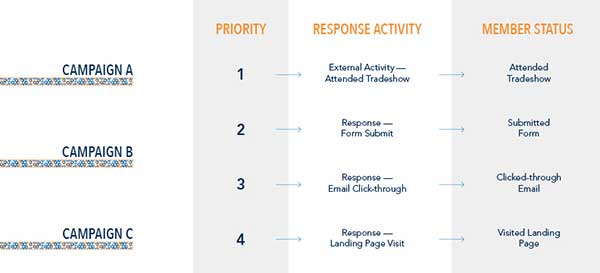
Response rules establish the types of engagement activities that are considered valuable to your organization and include various responses like clicks and form submits, as well as any external activities you have setup. Adding an activity to the Response Rules is the equivalent of telling Oracle Eloqua that when the activity is performed by a contact, it is a “response” to a campaign. For this reason, we do not want to add activities like “Email Send” to the response rules.
Does the order matter?
Yes, response rules should be configured in order of high-value to low-value response activities. While a contact can perform many response engagement activities for one campaign, at any time and over the lifetime of a campaign, the highest priority response activity will be the Member Status you see in your CRM system.
How often are response rules evaluated?
Once configured, response rules are evaluated every hour, five minutes past the hour. For each instance where a campaign canvas captured an activity defined in the response rules, Oracle Eloqua generates a campaign response internal event record and stores it in a back-end table.
Is the successful capture of campaign responses, intended for outbound integration, dependent on any other preliminary configurations?
Yes, to ensure the campaign response is captured correctly and prepared to the outbound integration, the campaign canvas also needs to have the following configurations applied:
- A checked “Sync to CRM” box.
- The presence of a CRM Campaign ID value.
- The asset related to the response needs to be visible on the campaign canvas. For example, a form must be on the canvas for form submissions to create a response record.
Pro Tip: The campaign member status values, aligned to each response activity, need to exist in your CRM as an available option value, otherwise the attempt to create the campaign membership record may fail. If the current available options do not support your business needs, your CRM team has the ability to setup any new options you may need. For example, many CRMs default to a “Responded” member status value, but you can set it up to differentiate between a Form Submit response versus an Attended Tradeshow response.
What is the “Briefcase Step” and how is it triggered?
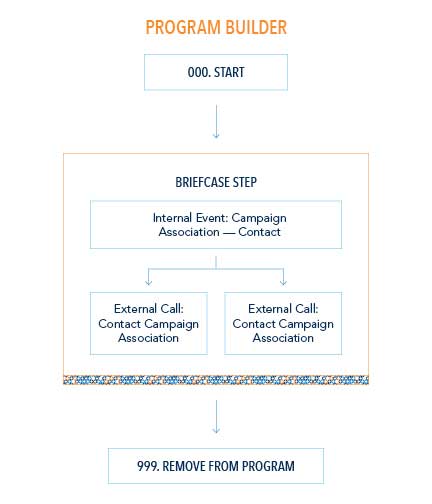
The briefcase step is triggered within a program builder canvas. The step itself executes when a contact reaches the configured “Send Campaign Information to CRM” default action step.
When executed, the briefcase step consolidates the applicable campaign responses taken by each of your Oracle Eloqua contacts and publishes the resulting campaign membership associations for each campaign the contact responded to.
Pro-Tip: Because various, custom applications of the program builder tool exist and are unique to each business process, it’s important for each individual company to decide when the publishing of campaign membership details, and subsequent inclusion of the briefcase step, should occur and be reflected within the CRM system.
What does the “Briefcase Step” trigger?
The Briefcase Step, when triggered, fires only one, natively named, internal event, the “Campaign Association – Contact” internal event.
As with other internal events, any external calls associated to this native internal event fire to complete the creation of the related campaign membership record in the CRM instance. The out-of-the box configuration defaults to a set of stack external calls, the “Lead Campaign Association” and the “Contact Campaign Association” external call.
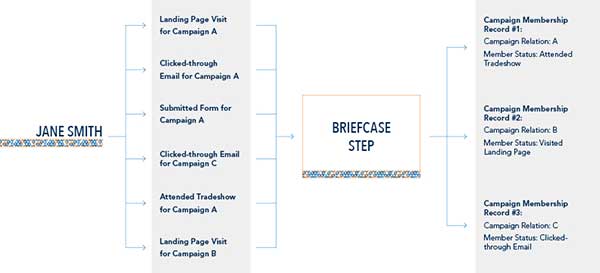
Now that the response rules have been configured and the briefcase step triggered within the program builder, any responses that have occurred within the defined response rules will be tracked and processed through the outbound integration, as a resulting campaign membership record within the CRM System.
According to the configured rules, what happens when Jane Smith visits a landing page and clicks an email associated to Campaign A?
Based on the response rule configuration we established above, the email click-through response is considered to be of higher value than a landing page visit, Jane’s membership record in the CRM for Campaign A will show a Member Status value of “Click-through Email”.
If Jane Smith returns to the Campaign A tomorrow and submits the form, what value should her campaign membership record reflect in the CRM system once the new response has been triggered through the briefcase step?
Since the form submission is considered to be the highest value response out of all the responses Jane has performed, the campaign membership record will be updated to reflect a “Submitted Form” status value in CRM.
Pro Tip: When sharing a form across multiple campaign canvases, the Oracle Eloqua campaign ID will need to be submitted with each form submission in order for the campaign response to be accurately recorded and attributed to the correct campaign.
If Jane Smith receives another nurture email from Campaign A and clicks the email, what value should her campaign membership record reflect in the CRM system once the email click-through response has been triggered through the briefcase step?
Since the form submission is considered to be the highest value response out of all the responses Jane has performed, the campaign membership record will NOT be updated to reflect a “Clicked Email”. Instead, the campaign membership record will retain the previously set “Submitted Form” status.
Within one month after first registering herself for the event, Jane attends the campaign specific tradeshow. Two days later, our team successfully uploaded the attendee list as a set of external activities and properly associated the attendees to the campaign. How is this campaign response reflected in the CRM system?
Because the physical attendance to a hosted tradeshow is considered to be the highest value response out of all the responses Jane has performed, the campaign membership record will be updated to reflect an “Attended Tradeshow” member status.
Meanwhile back in the board room, it’s your turn to present marketing’s budget request for the new fiscal year. The new request is 2.5 times the granted dollars for the prior year.
However, unlike last year, you have data showing how marketing-attributed revenue has increased month over month. Your regional sales directors are ecstatic about the new insights empowering their teams.
Conversations are spinning directly out of those marketing interactions, allowing sales team members to hold better, more targeted conversations at the right time leading to more closed/won deals in quicker turnaround times.
Data organized is information.
Information digested is knowledge.
Knowledge narrated is power.
Take your power back.
Questions or Comments? Need us to help you strategize a plan for nurturing leads and turning marketing efforts into sales successes? Comment below or contact us!
Share This
About the Author: Relationship One





