Responsive design. You’ve heard the term, right? You’re a marketing genius and totally in the know, so you’ve probably also heard terms like “mobile-friendly”, “mobile-optimized” or “scalable.” But what are we really talking about here?
The concept of optimizing layouts for both desktop and mobile has been around in the web world for years. Now it has crept into the realm of email marketing and is taking off in a big way. So what is responsive design, and should you consider it for your next email campaign?
Break it down for me: Scalable, Fluid and Responsive
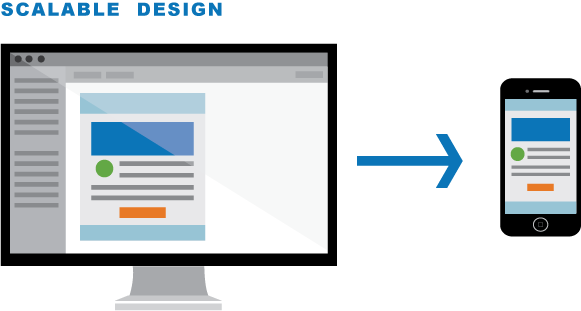
Jason Rodriguez at Litmus explains scalable design (also known as mobile-friendly) as: “…any design that works well across both desktop and mobile without using code to adjust table or image sizes, or display or hide content between the two platforms.” The key phrase here is “without using code.” A scalable design is simply a design-focused approach that scales easily from desktop to mobile.
- Designed to fit both desktop and mobile
- No special coding
- Layout does all the work: usually one-column with larger text and easy-to-click buttons
- No options to shift or hide elements

With fluid layouts, there is some use of code to adjust the width of your layout, but the customization options are limited, similar to scalable.
- Usually limited one-column layouts
- Content “flows” to device width, but there’s no change in layout/content
- Minimal use of customized code
- Typically best suited for text-heavy layouts

Responsive design relies heavily on custom code, but allows for the manipulation of email elements, giving you much more flexibility in your design. With responsive email, you can hide and move elements based on the device width, offering a tailored viewing experience for your users.
- Multi-column layouts
- Fully optimized content for each viewing experience
- Content can drastically change from desktop to mobile
- Heavy use of custom code
Litmus is a great resource for more details and even some code examples, if you’re into that sort of thing.
Give it to me straight: Pros and Cons
Have you ever tried to navigate a non-responsive website from your phone? I’m a fairly patient person, but zooming in on tiny text, endless side scrolling and carefully zeroing-in on tiny buttons is enough to make me want to give up browse elsewhere. As someone who surfs regularly from a phone, (and I don’t think I’m alone here), I’ve come to expect that websites be easy to navigate, regardless of the device I’m using. Shouldn’t the same expectations apply for email? In a magical, sparkly email marketing utopia, yes! But, we’re not there yet, so there are definitely some pros and cons to consider when deciding whether or not to go responsive.

1. Reach a wider audience
2. Provide a customized user experience
3. Increase email engagement
Bottom line: Millions of people are checking their emails from a phone or tablet right now. Responsive emails can help you reach them in a more meaningful way.
 1. More time to design, build and test
2. Knowledgeable designers and developers are needed and can be challenging to find
3. Email clients render responsive emails differently
Bottom line: Responsive emails can be time consuming and labor intensive, and you’re not guaranteed perfection across all platforms.
Help me decide: When and where?
In a perfect world (yes, with sparkles), email marketers would have the time and resources to make every email in every campaign responsive. But, that’s not realistic for most marketing teams and, in many cases, isn’t necessary. If you are thinking about going responsive, here some questions that might help you identify when and where it might be a good choice.
1. Know your audience.
What percentage of your email recipients are actually viewing your emails on a mobile device? If it’s significant, a responsive email might be a good way to enhance their experience and increase engagement.
2. Analyze your campaign.
What type of campaign is it? Single one-off or long-term evergreen? Are you casting a wide net or targeting a narrow group? Generally, the more emails involved in your campaign and the more people you plan to reach, the more likely a responsive email is to have an effect. For example, if your campaign only has one email and it’s only being sent to a small group, investing the time and effort in going responsive might not be worth it compared to a larger campaign with a wider reach.
3. Identify your purpose.
What is the focus of email? Are you trying to provoke users to sign up for an event, or is the goal to inform, like a newsletter? Think about how your users will be interacting with your email. If the purpose is to get users to click through (to sign-up or register for something) they might be more likely to do it if the email experience is effortless. If the email contains mostly informative text with few or no calls to action, a fluid or scalable design might be all you need.
I’m going for it! Now what? You want to do a responsive email? High five! Now what? Here are some tips to get you started:
1. Plan your content and layout carefully.
It’s easy to get caught up in all the bells and whistles of responsive, but if you’re just starting out, keep things simple, and work with a designer who understands responsive email design and its limitations. If you don’t have a designer, there are hundreds of articles on email design that can point you in the right direction.
2. Try a template.
Eloqua offers a few responsive email templates that can get you off to a good start. Play around and see what you can come up with.
3. Consult a developer.
Templates are great, but there are many situations that require more customizations than what they can offer. A developer who knows about responsive emails can offer you even greater flexibility and fine-tuning.
4. Set your expectations and pick your battles.
Responsive design is still a relatively new concept for email, so support across all email clients and devices varies greatly. Focus on optimizing for your key platforms and try not to get hung up on the rest.
So, what do you think? Are you going to try it out? Still on the fence? Does your email marketing utopia have sparkles too? Send me your questions or comments. I’d love to hear from you.
Share This
About the Author: Relationship One