

Oracle Eloqua’s Dynamic Content feature allows for content (images, text, offers, hyperlinks) that is on your landing pages or in your emails to change based on the individual viewing the content. Whether it be their gender, job title, location, or content they have engaged with previously, the individual will see a variation of the asset that is optimized for them.
Some of my favorite use cases for Dynamic Content include:
- Using a different geographical image based on the viewer’s location
- If you are hosting an event in various locations, provide customers with event information and maps specifically for the event in their area
- If a person has downloaded a specific thought leadership piece in the past, offer a different one.
- If your business requires different legal language or logos based on business line in an email footer
Awesome, right? It is. We’re talking personalization with great efficiency. But, before you go using Dynamic Content wherever possible, there are a few things to keep in mind to do it successfully.
1) Know Your Data
When you decide to leverage Dynamic Content, it’s most important to first consider what data points the Dynamic Content will be based on.
For example, if you want to change the content of an email based on the industry of the recipient, it’s vital that industry data be available and populated for your list. If only 10% of your contacts have that information populated, 90% of those receiving the email will simply receive the “default” content, which means you’ve spent a lot of time creating Dynamic Content for a very small outcome.
If you’re unsure whether or not your data is populated for a particular field, you can examine the field percentage completeness in Eloqua Insight. To do this, navigate into Insight. Click on Reports and Dashboards and select Contacts. Once in Contacts, select the Database Health Dashboard.

Once you’re inside the Database Health Dashboard, use the drop-down on the top left of your screen and select Contact Field Completeness.

Once selected, you will receive a visual dashboard of all contact fields and their percentages of completeness. This will allow you to see which fields would be best to use for segmentation in your Dynamic Content.
Also, in my experience, fields that have a standardized values are the easiest to work with for Dynamic Content. Typical fields that have standardized values are Country, State/Province, Industry, Job Role, Job Function, and Contact Type. When fields have standardized values, you are more likely to have cleaner data which makes Dynamic Content a lot more successful.
2) Follow The Rules Dynamic Content rules are set up in a similar manner to segment. You can set up the rules based on Contact field data, Custom Data Objects linkage, Custom Object record data, activity, etc. Once you have created all your rules, it’s important to remember how contacts are assigned to a Dynamic Content rule.
Rules are evaluated from the top down, starting with default and moving from your first rule to your last. When setting up the order of your rules, keep in mind that the first rule a contact meets the criteria for is the content they will receive. It’s important to strategize and prioritize which criteria of higher value.
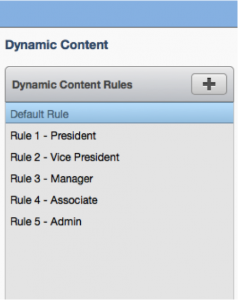
For example, if you are triggering off of a job title and an individual has a title of Vice President and you have a rule set up for any title that includes ‘President’ and a different rule set up for ‘Vice President’, you would want to ensure that the rule for Vice President falls first in the order of rules.
3) Testing Options
Here’s the honest deal, Eloqua doesn’t provide an easy way to test Dynamic Content. There isn’t a report that shows you as the user the breakdown of your content variations against your list. That doesn’t mean you shouldn’t test it though.
Our approach is to create a test segment that includes several internal team members. Update each team member’s contact record to reflect various scenarios of criteria that your Dynamic Content uses. Then send your Email to the test segment and have them report back on the results. Compare those results to what you expect to validate that you’ve set up the rules and content correctly.
4) How To Report
Eloqua’s reporting functionality for Dyanmic Content is limited. It’s important to know what Eloqua can report on and what it can’t. For example, Eloqua doesn’t show you what versions of your Content have received more engagement. This can be frustrating when you have put a lot of energy into creating different content for different groups of people.
If reporting on dynamic content isn’t of great importance to you, then this isn’t a concern. But for those who want to measure the success of their dynamic content efforts, there are some things you can do.
If your Dynamic Content offers a different link for each piece of content and you want to see what your links were clicked or your click through rates, you can navigate into Insight and look at the Email Link Click Breakdown report. This will show you which links were clicked and in which email.
If your Dynamic Content has the same link in each piece of content and you want to report on which version of the content received the most clicks, you can append a query string to each link to make each one unique. This allows you to be able to see which click-through reporting by link in Insight. For more information about using query strings in Eloqua, check out our blog, Up Your Cool Factor with 4 Ways To Use Query Strings.
Dynamic Content is just one of many methods you can leverage in Eloqua to bring more personalization and efficiency into your marketing efforts. If you’re looking for other ways to bring personalization to your contacts check out this goodie, Personalization: Not Just for Salutations.
Share This
About the Author: Relationship One





