Are you leveraging the power of dynamic content today? If the answer is no, be sure to check out Leah Brown’s article Tool Tip: Oracle Eloqua Dynamic Content. But if the answer is yes, I bet you’re using it in your email content – either as the whole email or sections of it. And if so, that’s great! Now I’m going to tell you how to take your dynamic content one step further to up your game in email personalization.
First, the What:
Dynamic content allows you to create pieces of marketing material targeted to specific audiences. This material or content can be placed in Eloqua assets, like an email. The power of dynamic content is in its ability to allow marketers to specifically market to various audiences using the same asset. For example, you can create one email and have a section of copy inside that email that dynamically populates based on the industry field stored on the Contact record using dynamic content rules. This allows you to dynamically target different audiences using only one Eloqua email instead of having to create multiple, unique emails for each different industry. Taking this one step further, once you’ve finished creating your email with dynamic content, you can also create a dynamic content rule for the subject line.
Then, the Why:
Dynamic content can be very powerful in terms of personalization and a significant time saver in asset creation. Once you create the email you also need to create the Campaign. With dynamic content, you can build one email instead of ten for each of your top industries, and you can do the same with Campaigns if you prefer. Imagine cutting down your asset creation from ten emails and ten campaigns to one email and one campaign. Or, as is more likely, if you’re currently building emails and campaigns for two or three of your top industries, you can now do so for ten much more quickly and thus expanding your level of targeting and personalization.
If you’re taking the time to target your email content to various audiences using dynamic content, shouldn’t your subject line be just as targeted? After all, the subject line is the first thing contacts see in their inboxes. And I’m here to tell you how easy that can be. Think of a dynamic content subject line as the cherry on top of your email personalization!
Finally, the How:
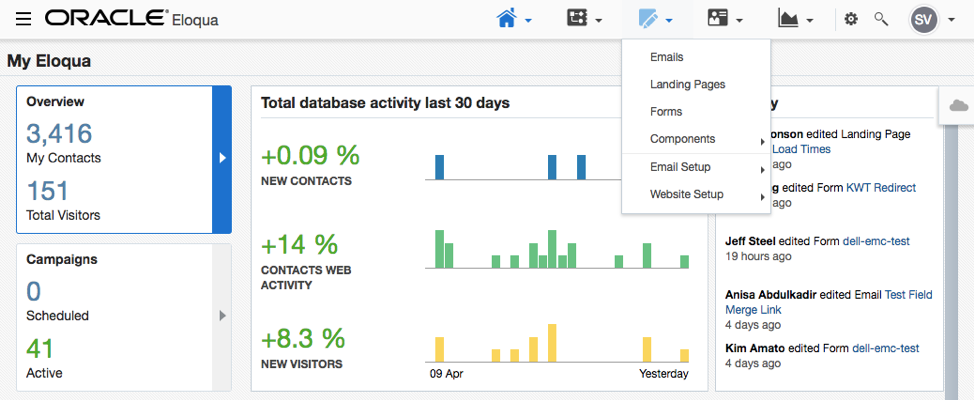
Using the navigation dropdowns in the top right corner of Eloqua, go to the third icon from the left (shaped like a pencil on paper), hover over ‘Components’ and then click on Dynamic Content. You can also click the hamburger (three horizontal lines) in the top left corner, in the navigation window that opens navigate to ‘Assets’ > ‘Components’ > ‘Dynamic Content’
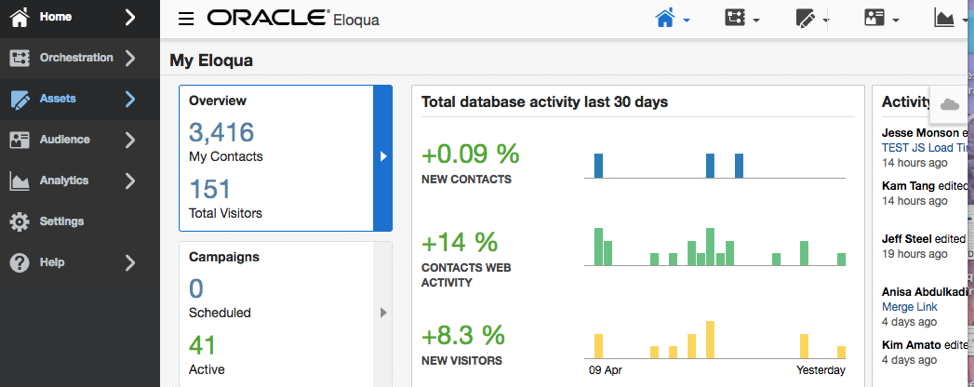
Once inside the Dynamic Content, you’ll see a folder structure to find existing content and the ability to create new.
Ideally, if you have already built dynamic content for an email, you would search for or navigate to that existing content in the folder structure and then right click ‘Copy’ – this will save you the time and effort it takes to build the dynamic content rules. Rename your copied rule to indicate that it is for the subject line. Then your only action is to update the content itself by very quickly removing the existing, copied content. If you have HTML email content I’d suggest going into the SRC code and hitting CTRL+A, or Command+A, quickly followed by a CTRL+X, or Command+X, or alternatively you can also do the same in the rich text editor. However, once cleared of the copied content with only your copied rules remaining you can very easily, using the rich text editor, add in your subject lines for each existing rule.
Alternatively, to start a new piece of dynamic content, simply click the “New” button in the top right corner of the screen. A new window will appear, and you can name your asset in the top left corner by double clicking where it says ‘Untitled Dynamic Content.’ You can then begin configuring your rules. Start with the default rule. This will be the defaulted version of content that will be shown to contacts who do not meet the criteria of any other rule that you build.
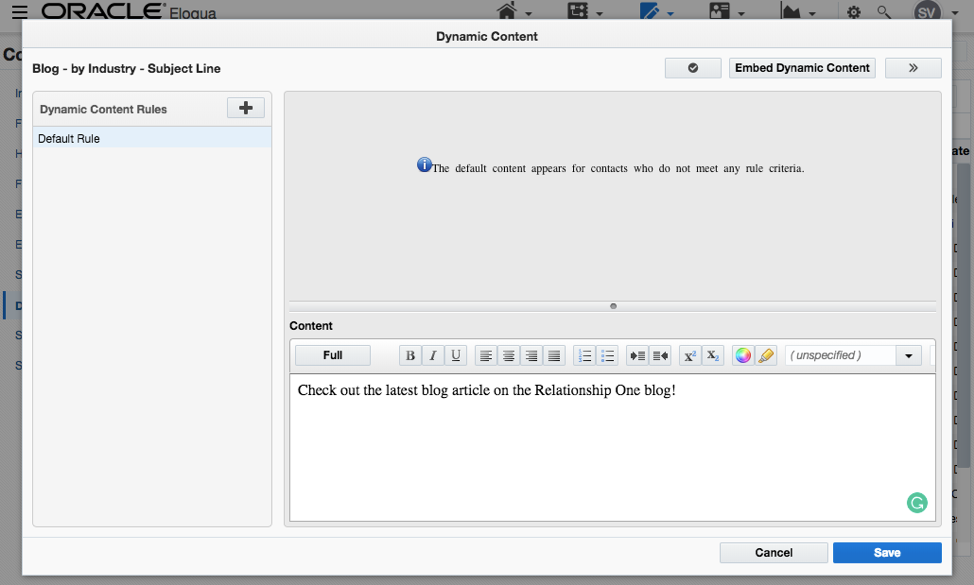
Since the default is exactly that, a default, you do not need to create a rule to filter contacts. The rules are configured in the top portion of the screen (notice the default message there for the default rule), however, you’ll still need to create your “content” or in this scenario your default subject line. You can do this directly in the rich text or WYSIWYG editor you see in the bottom portion of the screen.
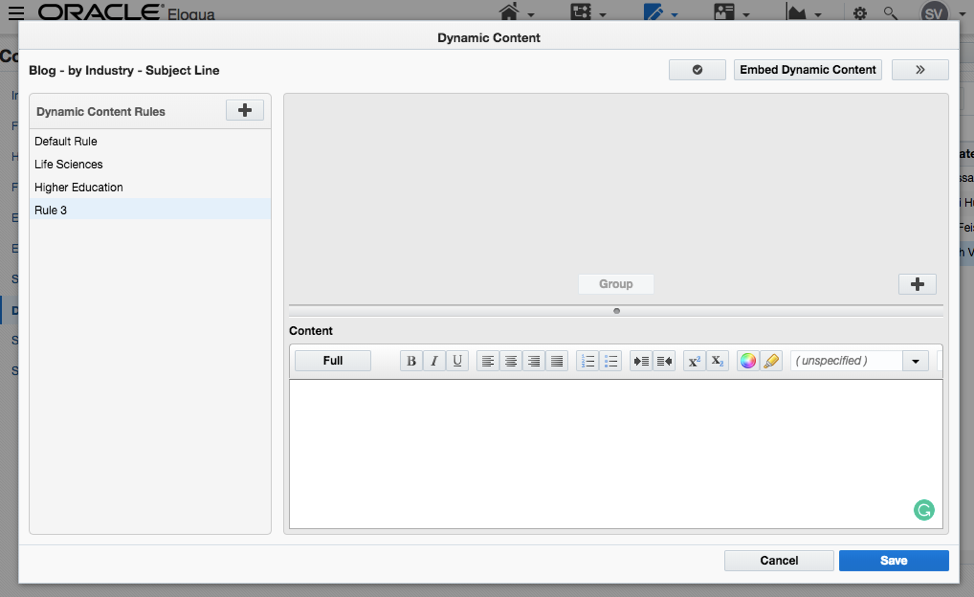
To create a new rule, click the plus sign icon located in the right corner of the left column next to where it says, ‘Dynamic Content Rules.’ Create as many rules as you need. Be sure to name each rule with a descriptive name by double-clicking on ‘Rule #.’’ For example, if you are sending specific content based on industry, name each rule one of the industry categories that correspond to the content within.
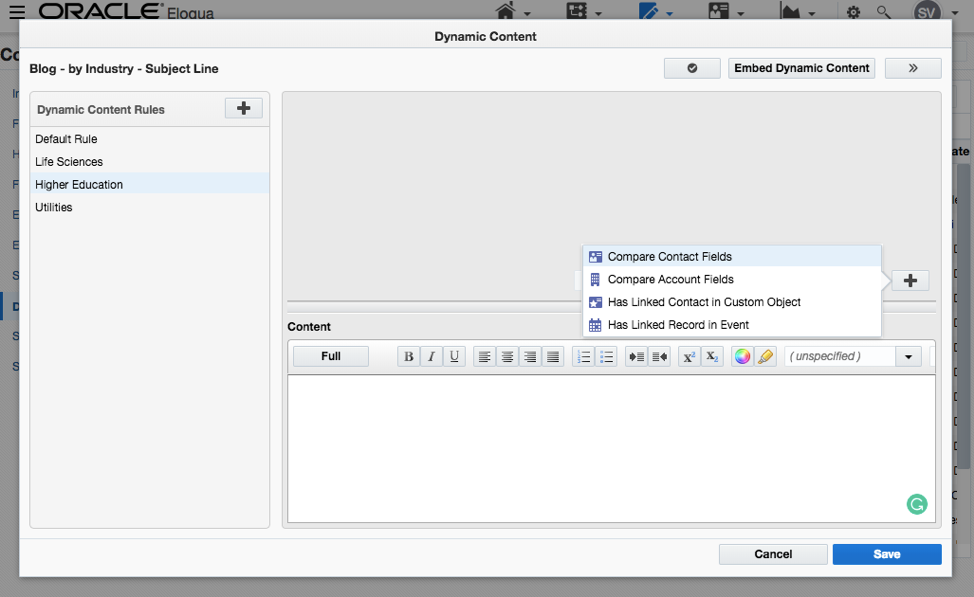
Once named, it’s time to build out the rule criteria. Click the plus sign icon in the bottom right corner of the top section of the right column. In the dropdown that pops up, you are able to choose from a variety of data types, including contact field data, custom object record fields, event records, and account fields. Configure the logic based on the filter criteria you would like to use.
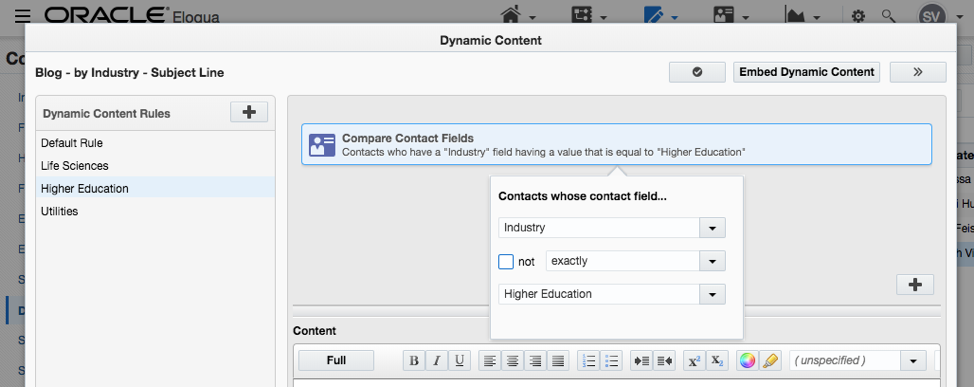
Similar to building a Segment, you can have multiple filter criteria with AND or OR statements that can be grouped together. But remember, when building your rules, Eloqua will process the rules top to bottom so if a contact meets your first rule it will not be run against any of the following rules, or if meeting none will fall to the default — so be sure to build your most specific or most important rules at the top first as you cannot reorder the rules once built.

Use the same steps as above to create as many different rules needed.
Note: When creating your rules note that the order you build them in is how they are listed on the left side screen. Eloqua runs through these rules in the order that you build them, so start with the most specific or most important rule you have first.
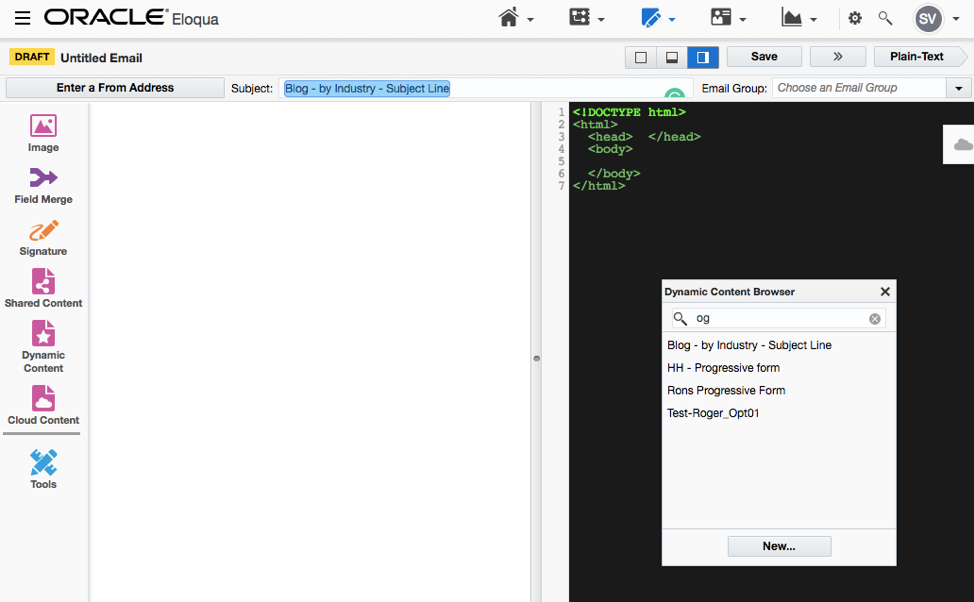
Once your dynamic content is created, navigate to your draft email and click the Dynamic Content icon on the left-hand side of the screen. Search for the name of your content and drag it into the subject line similar to how you would a field merge. Once there, it will appear in blue. You can still add text or emojis before or after the dynamic content.
Be sure to test or preview the email for each rule built to ensure your dynamic content is working correctly against the contact data. Then, to make the most of your impression in a contact’s inbox, feel free to send your first email with a personalized subject line!
Our team is full of Marketing Geeks. If you find you have an issue, need help with Eloqua, or need a deep dive into your marketing strategy, contact us! We love helping companies take their marketing efforts to the next level.
Share This
About the Author: Sarah Scott