

First, the What:
External Activities in Oracle Eloqua are records of outbound and inbound activity data that are not natively tracked by the platform. Oracle Eloqua will automatically track certain activity that it manages, including:
- email sends
- email opens
- email click-throughs
- form submissions
- website visits
But what it doesn’t see are your direct mail sends, visits to your trade-show booth, or attendance to your webinar. But it can, with External Activities!
Then, the Why:
Similar to the value of Oracle Eloqua tracking the activity associated with your emails, forms and landing pages, external activity data can be shared and used in many valuable ways!
In the Contact record view, users can see a list of Activities by type or one master list
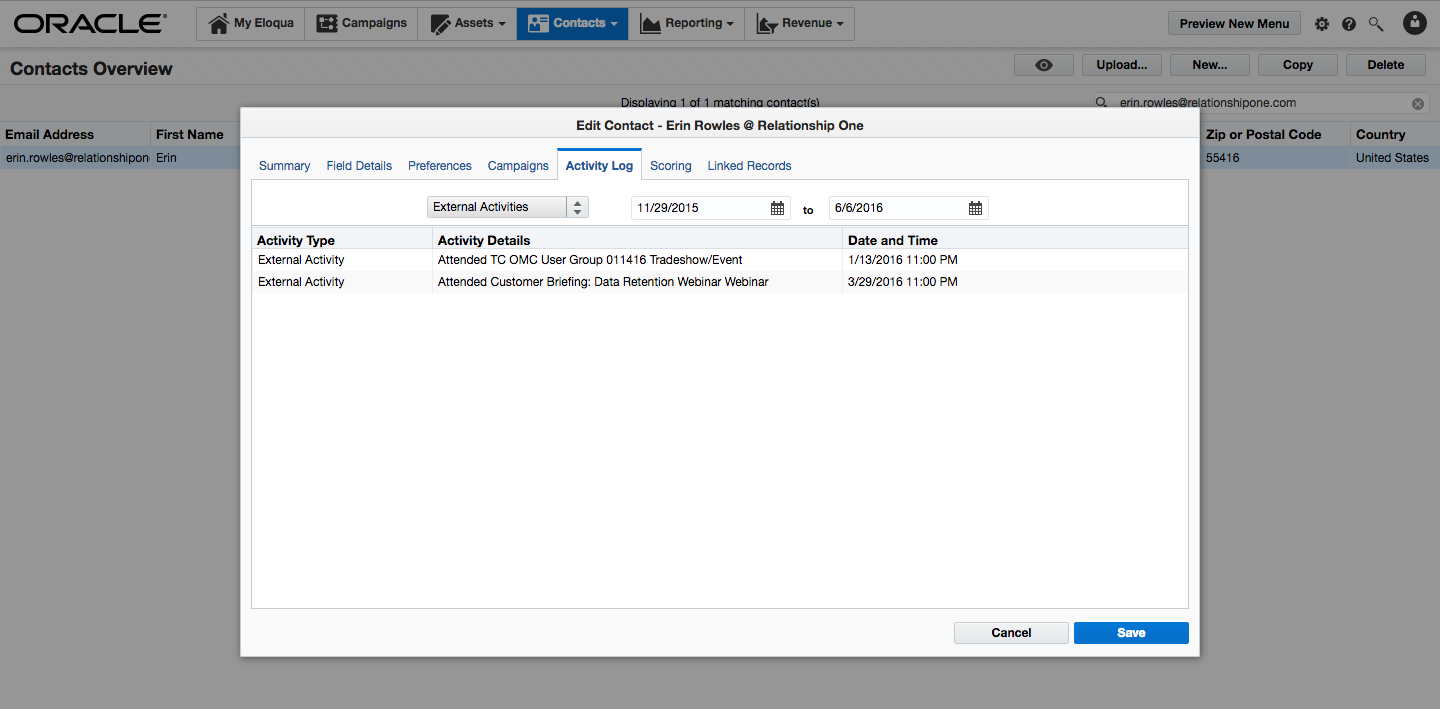
External Activities show up in Profiler so that marketing and sales can see a full view of all outbound and inbound activities for a particular prospect or customer.

You can build segments based on External Activities using a filter.

If you’re sending campaign activity to a CRM for sales to leverage, External Activity data can be shared as well, either in the form of Activity records or via Campaign membership.

In summary, External Activities allow you to augment the activity data that Oracle Eloqua tracks so you have a wider lens of the outbound and inbound touches that marketing is managing.
Then, the How:
The first step is to set up your Oracle Eloqua instance to know what External Activities you want to track. Admin users are able to set up and manage External Activities within ‘External Activities’ which can be found in the global Settings area of Oracle Eloqua.

It is here where an admin can add an External Asset Type (e.g. Direct Mail, Webinar, Tradeshow, Text) and all of the activities you want to record for each asset type.

Once External Activities are configured, you can start generating them inside your Oracle Eloqua instance.
You’ll need to create a list of Contacts (email address required) to generate External Activities against. Here’s a sample spreadsheet with the minimum required information to generate an External Activity for a Contact. Fill in the appropriate values within each column for every of row (Contact) on the list.
- Email Address (required field to create/update an Eloqua contact)
- External Asset Type (pick from the External Asset Type configured in the setup step)
- External Activity (the activity that the contact performed, choose from External Activities list associated with External Activity Type configured in the setup step)
- External Activity Date (the date that the activity occurred, xx/xx/xx)
- External Activity Name (a unique name for the activity that helps to differentiate between External Asset Types. For example, the name of a specific webinar)
You can include other Contact-related data such as First Name, Last Name, Company, Lead Source, etc. This data can also be loaded into the database to create new or update existing Contact records during the upload process. Once your spreadsheet is complete, you’ll need a Campaign in Oracle Eloqua to attribute the activities to. Within the drop-down menu of the Campaign, select Upload External Activities.

Follow the step-by-step wizard to generate the External Activities for the list of Contacts. Note: the campaign has to be in ‘Active’ status to be able to upload activities.

Oracle Eloqua will process the activities and send you an email notification confirming that the External Activities have been generated. You can test that the process worked by looking at the activity history on one of the Contacts on your list.
If you have any questions about Oracle Eloqua External Activities, use the comments option below or contact us.
Share This
About the Author: Relationship One





