

Happy 2017 modern marketers! While you have been busy putting away holiday decorations, popping champagne, and finally wrapping up your in-laws “visit”, we’ve been hard at work releasing some new apps and integrations for the Oracle Marketing Cloud. Now this may seem like it has nothing to do with a New Year’s resolution, but you just wait.
We’ve been using LinkedIn and Twitter (both traditional and pay-to-play) as one way to communicate the availability of our new apps to a relevant audience. But recently, we have been really excited about these platform’s social advertising capabilities. These ads allow us to narrow in on a targeted group of profiles, grow our visibility, and get in front of our prospects in a new way. With every ad campaign we do, we analyze how we did so we can optimize and make improvements in the future.
That is why it should be every social marketer’s resolution to use paid advertising more in 2017! Targeted, trackable, and not-so time consuming, what’s not to love? Since we are well-versed in both LinkedIn and Twitter advertising, this two-part blog series will focus in on each platform’s capabilities.
Let’s start with LinkedIn. Grab a blanket, shake the glitter confetti off your keyboard and get ready to learn!
LinkedIn Advertising
It is no secret that LinkedIn reigns supreme for business and professional networking, making it the perfect platform for your B2B advertising. Depending on the size of your audience and the type of message you are looking to send, LinkedIn offers three major options for self-service advertising. These include: Sponsored Content, Sponsored InMail, and Text Ads. Allow me to differentiate with a little help from the LinkedIn Campaign Manager.
- Sponsored Content
“I want to reach LinkedIn members right in the LinkedIn feed and beyond”
These ads are featured right on your targets’ newsfeed, and even better, right towards the top. They appear to be regular updates but contain a small label of “sponsored”. Your targets can easily like, repost and interact with these ads because they are regular posts. Within the setup of these ads you select your target audience and can adjust your campaign spend and duration. - Sponsored InMail
“I want to sent targeted messages directly to the people who matter most to my business”
This ad function allows you to send a personalized message to your target prospects. Sponsored InMail appears in the LinkedIn Inbox of your target and looks to be a regular message. The main purpose of these is to personalize your message and drive super-targeted conversions. These ads are perfect for boosting registrations and only go to LinkedIn members that are active. - Text Ads
“I want to drive targeted leads across multiple LinkedIn pages”
These ads are the most traditional in appearance. Text Ads appear in the sidebar of a LinkedIn newsfeed view. They appear as a small image and short description, with no capability of a prospect commenting, liking or re-sharing. Unlike Sponsored Content though, they drive engagers right to a website or landing page instead of a post on a single account page. Similar to Sponsored Content, you can define your target and set budget and duration specifications. Also choose between Pay Per Click or Cost per Impression options.
At Relationship One, we are most fond of Sponsored Content. We like being right in front of our prospects, and enjoy the idea of looking less like an ad and more like a super important post. Setting up our Sponsored Content campaign is easy to do.
Before I break it down, make sure that you are set up as an administrator for your organization’s LinkedIn business account. Once you log into your account, you can navigate to Advertising by hovering over your profile icon in the top right and scrolling down to “Advertising”. Once that window opens, click “Manage Ads” at the top and begin the process:
- Select the type of campaign you’d like to create. Name your campaign – If you plan to duplicate ads, it may be helpful to develop a naming convention that specifies the date or other important details.

- Select the content you want to sponsor or create new content – If you want a particular post to get a little extra love, just check the box. Otherwise create a new post with an image, copy and link if desired (top right corner of screenshot).
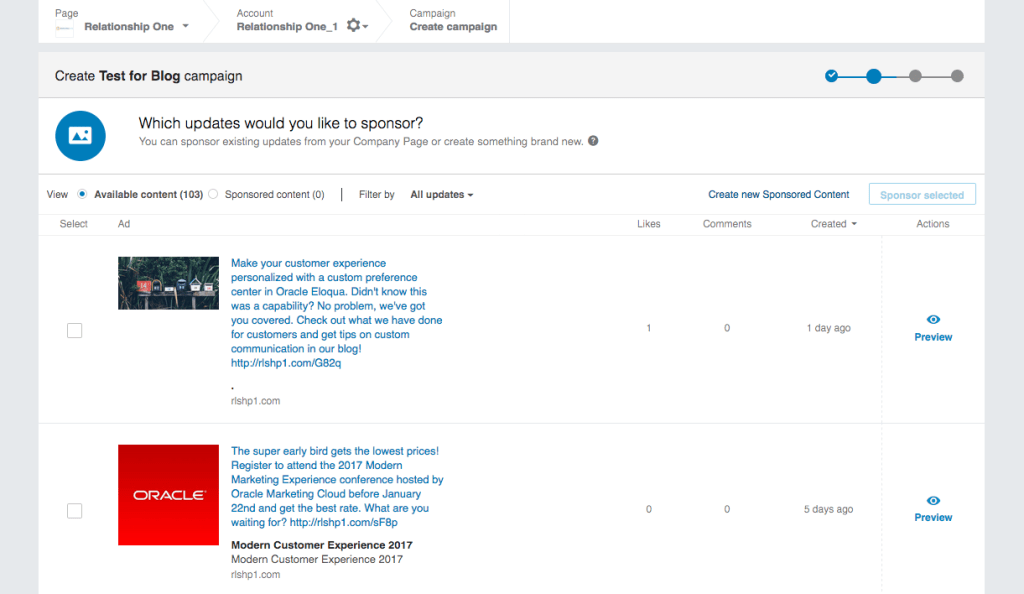
- Target your audience -Select a specific location, if relevant (e.g. events), and then filter further by targeting everything from company name to member age. Careful not to create too narrow of a filter; LinkedIn won’t let you post without enough of an audience.
*We have found it helpful to save our campaign audience as a template for future use.
- Decide on your spend – We prefer to pay by Cost per click (CPC) and to follow the suggested bid as provided by LinkedIn. As far as daily/total budget, that’s for you to determine!

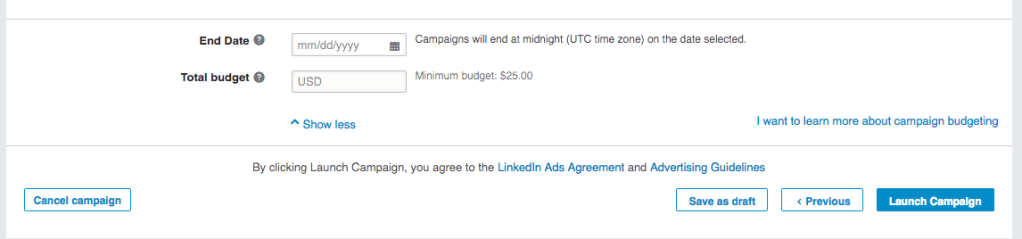
- Decide your Start Date and End Date
*Total Budget and End Date are extra options you can define by selected “Show More”.
Of course, LinkedIn offers helpful analytics for your ad campaigns. You can sort your campaign manager to look into specific campaign performance, seeing details such as conversions, impressions, clicks, social actions, spend, as well as the custom parameters you set above. Dive deeper into your analytics with engagement and conversion actions and costs. It is a good idea to set goals for your campaign so you can better assess your analytics. Maybe you want to get a certain number of clicks or conversions. Or perhaps you are just looking for increased engagement. Either way, “good” results from a campaign depend on what you are trying to achieve.
Pretty cool stuff, eh?
Who knew it could be so easy to make such a precisely targeted, affordable campaign! Now you do, so get on it! One resolution down, one more to go. Stay tuned for the run-down on Twitter advertising, coming soon!
If you have any questions or comments about LinkedIn Advertising, please reach out!
Share This
About the Author: Relationship One





