

It’s that time of year, out with the old, in with the new. Did you make resolutions for 2017? How about for your marketing automation platform? That’s an easy one you can stick to without dieting or hitting the gym! Here are eight to-dos to make sure you’re on the Eloqua road to success right from the get-go in 2017.
Update your email and webpage page footers!
It’s 2017; if you’ve got dates that go back to Y2K in those footers it’s time to do a quick audit. You don’t want your consumers to wonder if the information your providing is out of date.
Clean house my little Elo-queens and -kings!
On the Eloqua home base after you log in, you can easily see how many contacts are in your database. Most Eloqua contracts are based on the number of contacts you have so it’s an important stat to keep tabs on. Do you have contacts that are inactive, hard bounced, or globally unsubscribed? They are taking up space and bandwidth in your Eloqua platform.
A simple segment to find these records will do the trick. For inactive, perhaps start with anyone who has been in the database greater than 1 year but has had no responses. Create a segment with these filters then export these offenders (we recommend exporting all data available and storing the data somewhere just in case). Then reimport the list as ‘Delete Contacts’ to remove them from your database.
Double-check your email deliverability metrics!
You may be quite surprised what you see. Check the ‘Bounce back History with Messaging’ report in Classic Insight. It’s under the Analytics tab. Hopefully you don’t find “the content of this message was blocked due to spam content” or “RID 0 – 5.1.0 – Unknown address error (‘553’…..’).” Not good ones to see!
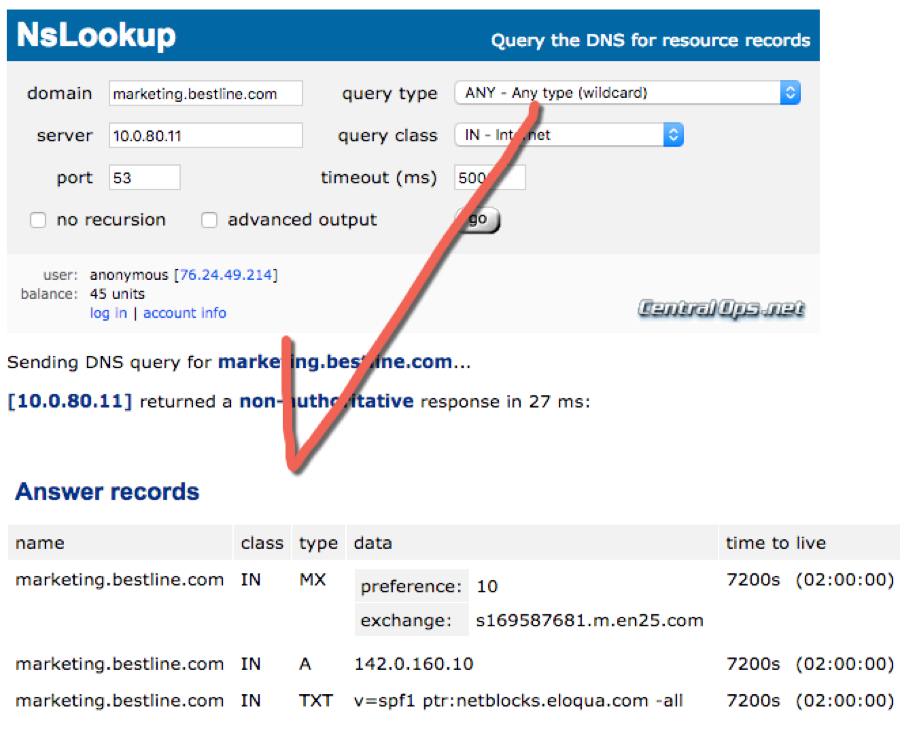
It’s crucial to ensure your DNS is setup correctly for your emails. It’s also very easy to check. There are tons of freeware tools. Some of my favorites are:
- CentralOps: Use to look up any part of DNS configuration
- UltraTools: Same as above
- DKIMCore: Use to validate proper DKIM
Make sure your settings match your Branding & Deliverability Workbook that your organization completed during your Eloqua implementation. Your marketing operations team should have a copy of this for your install, if not Oracle Support may be able to provide your completed document from your original implementation. This is especially important if you have dedicated IPs or DKIM signing. If you aren’t sure what you are looking for or need help troubleshooting, Relationship One can help!
Also, now is as great of a time as ever to check your sender score.You can sign up for a free account and check your sender score rating and blacklists. The closer your score is to 100, the better!
Below is a great example of a properly configured DNS. Whatever your subdomain may be, yours should look similar.
Check the statuses and end dates of you campaigns!
This governance tip is one that’s often overlooked. If you have programs or campaigns with end dates based on the default of three months after activation, you may find them in a ‘Completed’ Status now when they shouldn’t be. Make sure you’ve got your dates pushed out as far as needed for production and reporting.
Where are my leads?
If you’re integrated with a CRM, another critical component of managing Eloqua is the integration area. Your Eloqua administrator should be frequently checking for failed external calls and fixing/reprocessing them. My favorite way to view these is to navigate to Settings > Integration and on the main panel hover over ‘Failed updates’ and click ‘View by external call’.
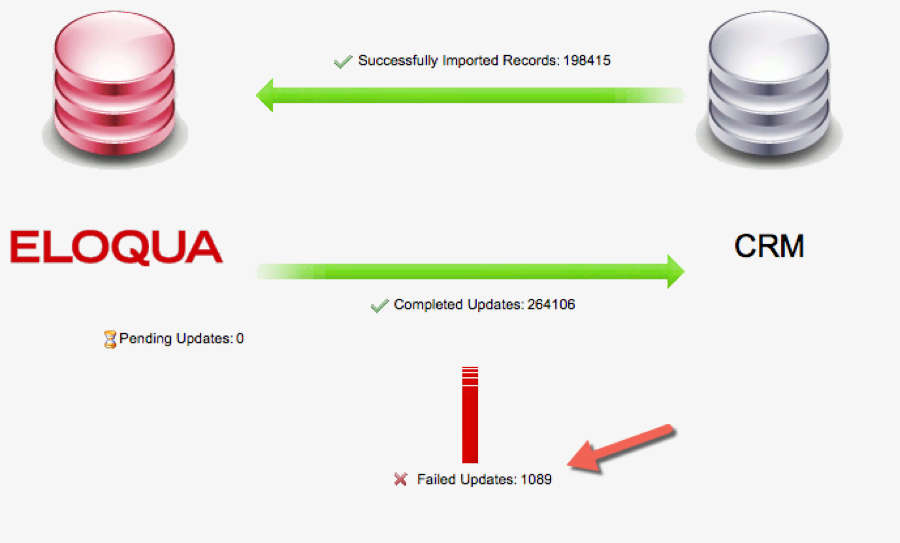
Here you can see any calls your CRM has blocked. Some should not put you into panic mode, but external call failures for ‘Create Lead or ‘Create Campaign’ should sound the alarm bells. You can drill into the failure reason for each call here, fix the data, then resubmit.
Later gator!
Do you have team members or partners who still have access to your Eloqua instance? Update that user list! Better make sure those who are gone are deactivated. You can export the full user list easily by navigating to Settings > Users and under Users, click to ‘Download Users’. Normally I don’t recommend deleting users as their username may actually be tied to some configuration as a dependency. You can simply deactivate them to ensure they can’t get into the system.
Speed up!
Your programs, that is. Have you checked out the new Program Canvas? If you’ve got the time, it’s worth moving your program builder programs to these new features. Program Canvas runs lightning fast and can save time in the dreaded ‘daisy chain’ of events that need to take place from Eloqua entry to CRM entry. A side fun tip: If social media is your thing, check out the new Facebook feeder app which seamlessly integrations leads from your Facebook forms into Eloqua and right to CRM! See the Eloqua Help Center for more information on Program Canvas.
Quite possibly the most important: What are your 2017 departmental marketing goals?
If you don’t know, ASK!! It’s so important that you have a roadmap for your Eloqua usage and that you’re planning programs that align to your company’s goals. Is it customer retention this year, or a cross-sell nurture, or getting that welcome campaign going? Prioritize your list according to company goals and revenue generation. You have the BEST marketing automation tool in the industry. Use it to it’s potential to execute and augment your multi-channel marketing initiatives.
As 2017 begins, I reflect on all the things I am thankful for and how I can keep striving to get better and better each year. Here at Relationship One, we wish all of our customers and Eloqua users a happy and healthy 2017. Don’t hesitate to call on us for help with any of the tips above. Technology is moving fast and I’m predicting another awesome year for all our modern marketers!
Share This
About the Author: Relationship One