

 Part Three: Our Automation Solution and Implementation
In my first blog post, I talked about the short comings of most nurture tracks. In my second, I discussed our solution to these perceived problems. In this blog post, I am going to detail how we implemented this solution within Oracle Eloqua; in other words, the fun part. I also want to share with you some of the metrics we are seeing from our nurture track.
Content Strategy
We targeted the “marketing” persona for our first nurture track since we had the most content for that persona and we had a good win rate with marketers. The marketing persona comes to ReadyTalk to have a specific set of problems solved. Below, you can see the four problem scenarios we created for the marketing persona and a short description of each.

Once we had the problem scenarios mapped, we then split our content into buyer stages: awareness, research and evaluation.
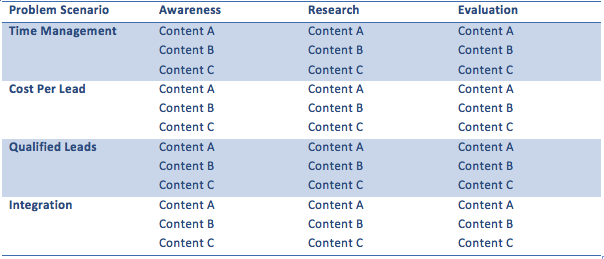
Each problem scenario at each stage has three pieces of content which are delivered via email to the prospect within that stage. We made this decision to ensure that the prospect had plenty of opportunities to engage with the problem scenario before moving them to another one. There are 36 pieces of content.
Automation Strategy
The operations team looked at all of the requirements for the nurture track and came up with a strategy to not only deliver the content, but allow for flexibility, measurement and scalability. The following listed features and functions are what we used:
- Program Builder
- Progressive Profiling Cloud Component
- Query Strings
- Blind Form Submits
- Redirect to Webpage with lookup for URLs
- Data Normalization Cloud Connector
- Page Tagging Groups
- New Email Metric Reports
- Salesforce.com Dashboard
- Activity Driven Content
The end result was astonishing: 22 interconnected programs, 109 shared filters, 72 contact groups, 36 emails, 30 landing pages, three progressive profiling components, eight pieces of Activity Driven Content, five blind form submits, 17 new Salesforce.com Charts, four new email metric reports and three new page tagging groups!
Program Builder Overview
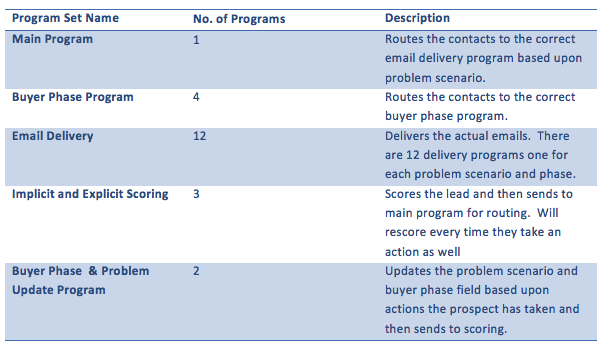
Program builder was used because it has more capabilities than campaign canvas – namely the ability to remove people from contact groups, run update rules and fire integration events. Our work in program builder can be split into the following categories for organization:
Progressive Profiling
We wanted progressive profiling to reduce the amount of friction it takes to engage with our content. We also wanted to use it to ensure that as prospects moved down the funnel, we gathered the necessary information for our sales representatives to make contact. We decided to make three progressive profiling components – one for each buyer phase. They are listed below with the information they collect:
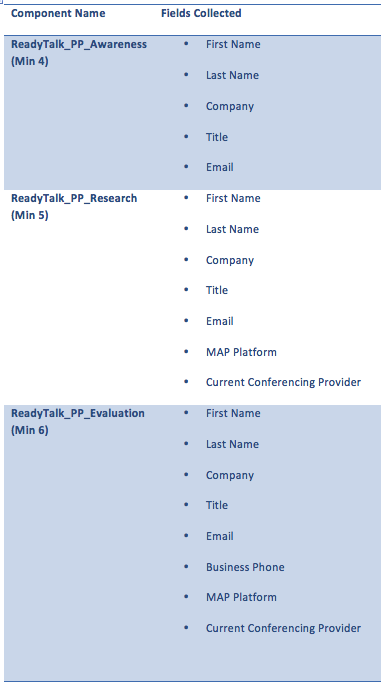
Some things to note:
- If a prospect goes through awareness > research > evaluation, they will never see more than four fields.
- Phone number is collected only at the evaluation phase so the representative can call the prospect.
- If a prospect engaged with evaluation content as a net new, they would see the most possible fields, which are six.
- Query Strings were used in our progressive profiling as DocID=6. This allows us to scale the delivery of content and score content based on the query string. Each query string is mapped to a particular problem scenario and phase.
Blind Form Submits
We built blind form submit links for content that is not behind a form. Specifically, blog posts and webinar recordings are not always behind forms, but we wanted to know if the prospect had engaged with the content regardless. The blind form submits also use the same query string methodology for scoring and lead routing.
Data Normalization Cloud Connector
The data normalization cloud connector allows us to take the title of the prospect and then map the department (job function) and the job level (c, director, manager, VP). Both of these fields are used in our explicit scoring program.
Page Tagging Groups
We created three new page tag groups that relate to our three phases of awareness, research and evaluation. This scales easily as well since it allows us to just add new pages to these groups for scoring.
Activity Driven Content
We used activity driven content in our integrations emails to streamline the process of sending automation specific content. If we know the prospect’s marketing automation solution, we send them information specific to that solution. Since we integrate with several solutions, we used ADC to help save time and make it more efficient.
Query Strings
We used query strings to deliver the content because it was scalable and easily tracked. When a new piece of content is added to the program, it is designated a query string and then that query string is added to the scoring program. That’s all it takes to add new content.
Part 4: Metrics that Matter
Obviously, all the great processes in the world and all the slick automation does not mean a thing if no one is engaging in your content and moving down the funnel to buyer ready. I wanted to share with you some of the metrics we are seeing from our nurture track after over 40,000 email sends.
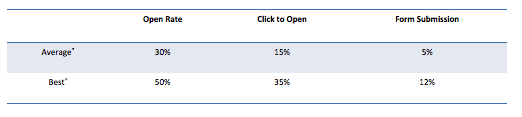
As you can see from the table above, there is strong engagement across all tracks (30/15/5), and our best track is absolutely killing it! (50/35/12).
The way the program is set up, it is also easy to tell how many people you have in each stage (as seen in the chart below). And, by applying velocity and conversion to each stage, you can predict the number of MQLs that will be generated in a given time period.

Obviously, leads in evaluation are one step away from being converted to MQLs. It also allows me to identify leads that have been stuck in evaluation (or any stage) and conduct targeted campaigns against those leads knowing the business problem they are interested in solving.
I would love to hear from people who have done similar things and how they have accomplished it. Share your story.
Share This
About the Author: Guest Blogger