

First, the what:
Last October, we published a blog that illustrated the many benefits of Oracle Eloqua’s newly developed Program Canvas. Now, it’s time to give you useful tips on how to successfully migrate your existing processes built in Program Builder, to the extremely efficient and easy-to-use Program Canvas.
Then, the why:
In the world of marketing automation, we often hear that it’s essential to “deliver the right message, to the right audience, at the right time”. The key word I’d like to focus on is time because that is where Program Canvas absolutely outdoes itself. One of the key pain-points we often hear from our clients is that leads take too much time to process in Program Builder. Depending on how many steps are in a program, it could take hours on end for a record to run through. In terms of scalability, what happens when your internal processes require precious leads to run through many customized programs such as data standardization, subscription preference updates, and lead scoring prior to the sales team even seeing these leads within CRM? That’s time left on the table — time your competitors are taking advantage of.
Finally, the how:
Step 1: Document the programs that are currently running in Program Builder
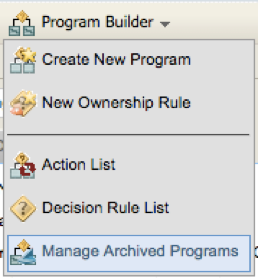
The thought of migrating your existing programs into Program Canvas may be a daunting one to say the least, and trust me when I say I understand that this might be no small undertaking. Nevertheless, it is important to start from the very beginning and assess what programs are actually running through Program Builder. By navigating to Orchestration > Tools > Program Builder, and clicking on the “Program Builder” dropdown in the top left corner of the screen, you’ll have the ability to see what’s currently running by clicking “Manage Archived Programs”. Now, I will say that this area is meant to archive inactive programs, not audit what programs are running. However, at the same time, it gives you a clear view of your active programs, indicated by the orange diamonds next to the program name.
Step 2: Understand and audit the actions being performed within each program
Now that we’ve documented the programs that are currently running within Program Builder, it’s time to dive a little deeper at a per-program level. It’s important that we take a close look at the actions each step is performing and compare these steps to what’s available within Program Canvas. There are currently a number of actions and decisions that we can simply re-use within Program Canvas, while there are others that are unavailable at the moment. Here are the actions and decisions that we currently have available within Program Canvas:
Actions
- Update Rules
- Subscribe/Unsubscribe Contact
- Add/Remove from Shared List
- Add/Move to Program Canvas
- Add/Move to Program Builder
- Add/Move to Campaign Canvas
- Add Linked Record to Program
- Form Submit
- Wait
- Delete Custom Object Record (*for CDO Program Canvas Only)
- Compare Date (*for CDO Program Canvas Only)
Decisions
- Compare Contact Fields
- Compare Custom Object Fields
- Shared List Member?
- Shared Filter Member?
- Subscribed to Email Group?
- Has Linked Contact (*for CDO Program Canvas Only)
In addition, you can review the current AppCloud catalogue, as there are a number of apps that can be added to the Program Canvas Interface. For example, the Contact Washing Machine will replace a number of actions that exist as separate components within Program Builder. So, it’s important to understand what resources Oracle provides while migrating these programs.
Step 3: Use what’s available to rebuild your programs in Program Canvas
More than likely, you’ll be able to at least build some of your programs based on the actions Program Canvas has available within its current state. For example, we have many clients utilizing Program Builder with a number of update rules for custom lead scoring. These can be migrated! On the same note, take those data standardization steps currently running within Program Builder and create them in Program Canvas as well!
Take a close look at the list of actions and decisions above and compare them to the steps within Program Builder. As I mentioned, if your programs are utilizing update rules heavily, then it’s beneficial to spend some time upfront rebuilding your programs in the Canvas.
Do this for programs that are running at the Contact and Custom Data Object level, as program canvas can process both. For contacts, you can add a segment or you can set up Listener steps that will query Eloqua for things like changing lead score, contact creation, or campaign responses. In addition, you can push contacts from a variety of other areas such as forms, segments, and Campaign Canvas to name a few. If you’re rebuilding a Custom Data Object Program, you’ll be able to leverage Custom Object Record Services.
Step 4: Keep an eye on future Program Canvas developments
Although there are a number of types of programs we can migrate using Program Canvas, it’s no secret that there are still some vital program steps that only exist within Program Builder. Take, for example, all of the internal events that trigger the integration to CRM. At the moment, these steps are only available within Program Builder (*Note: Oracle Sales Cloud integration calls are currently compatible with Program Canvas). In this case, we have clients that build a majority of their programs in the Canvas and end the program with a “Move to Program Builder” step in order to trigger the integration calls. However, Oracle has confirmed that soon, we will be able to utilize Program Canvas for our integrations as well. Considering the amount of time it takes for contacts to process through Program Builder, this is huge news, and ultimately we’ll be taking one step closer to bridge the gap between sales and marketing.
In summary, there are a number of beneficial ways to take advantage of Program Canvas. There’s never a time like the present to take a good look at how we, as marketers, can make our companies’ internal processes more efficient. And by going through a migration like this one, that’s exactly what we’re doing.
If you have Eloqua and you need support with Program Canvas, please contact us! We love helping companies transform their marketing automation.
Share This
About the Author: Relationship One





